Table of Contents
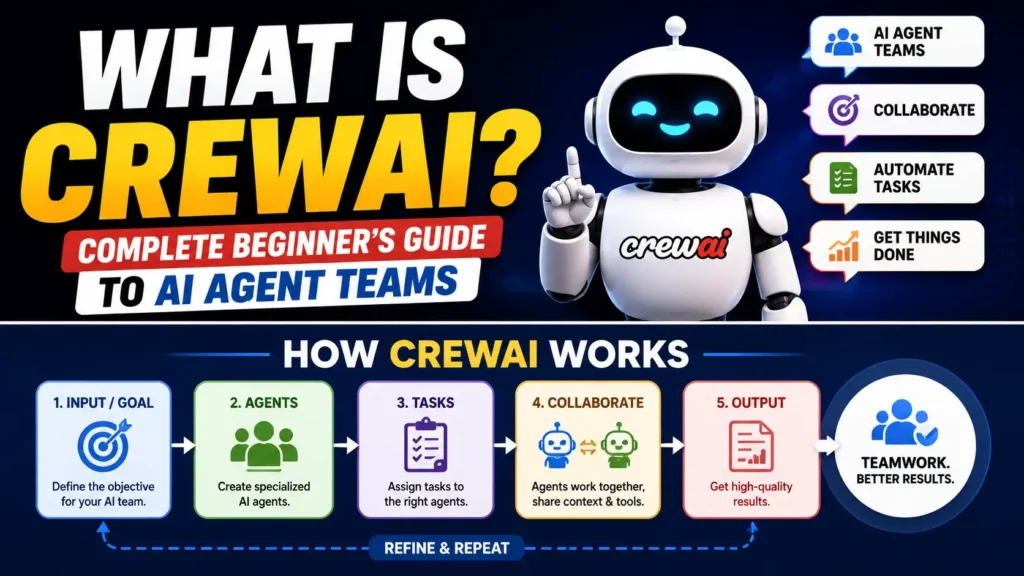
CrewAI If you have ever hired a small team for a project, you already understand this concept before reading a single line about it.
You do not hire one person to do everything. You hire a researcher, a writer, a designer, a project manager. Each person has a title, a responsibility, and a clear job to do. They work together, hand things off to each other, and the project gets done better than if one overworked person tried to handle it all.
CrewAI brings that exact hiring philosophy to artificial intelligence. Instead of human employees, you assemble a crew of AI agents, each with a defined role, and let them work together toward a shared goal.
This guide explains what CrewAI is, how it works, and walks you through three real US businesses already using it, all explained in plain English with almost no coding involved.
What Is CrewAI?
CrewAI is an open-source framework that lets you build teams of AI agents, where each agent has a specific role, a clear goal, and access to particular tools, working together to complete complex tasks.
The name gives away the entire concept. A crew is a group of people working together under clear roles toward a common objective, like a film crew or a ship’s crew. CrewAI applies that same structure to AI agents.
Where other multi-agent frameworks focus on agents having open-ended conversations, this one focuses on structure. You define exactly who is on your team, what their job title is, what their specific goal is, and what order they work in. This makes it one of the most intuitive frameworks for beginners because it mirrors something everyone already understands: how a real team works.
It was built specifically to make multi-agent AI accessible without requiring deep AI research expertise. It has quickly become one of the most popular choices among small business owners, solo entrepreneurs, and developers who want production-ready AI teams without a steep learning curve.
To see how this framework fits within the bigger picture of collaborative AI, our multi-agent system guide explains the foundational concept clearly.
Why CrewAI Feels Different From Other Frameworks
If you have read about Microsoft AutoGen, you might wonder how it differs from other frameworks. The honest answer is approach and personality. Explore What Is Microsoft AutoGen? Complete Guide to Building Multi-Agent AI Applications
Microsoft AutoGen agents are designed to converse, debate, and challenge each other’s outputs, similar to a brainstorming session between colleagues.
These agents are designed to operate like a well-run department. Everyone has a job description. Everyone knows their task. The workflow moves from one role to the next in a clear, structured way.
If AutoGen feels like a creative writers room, CrewAI feels like a project management office. Neither is better. They simply suit different kinds of work. It tends to be the easier starting point for beginners precisely because the structure is so clear and familiar.
Our agentic AI guide is a useful companion if you want to understand the deeper concept of autonomous AI systems before diving into this framework specifically.
The Core Idea: Crews, Agents, and Tasks
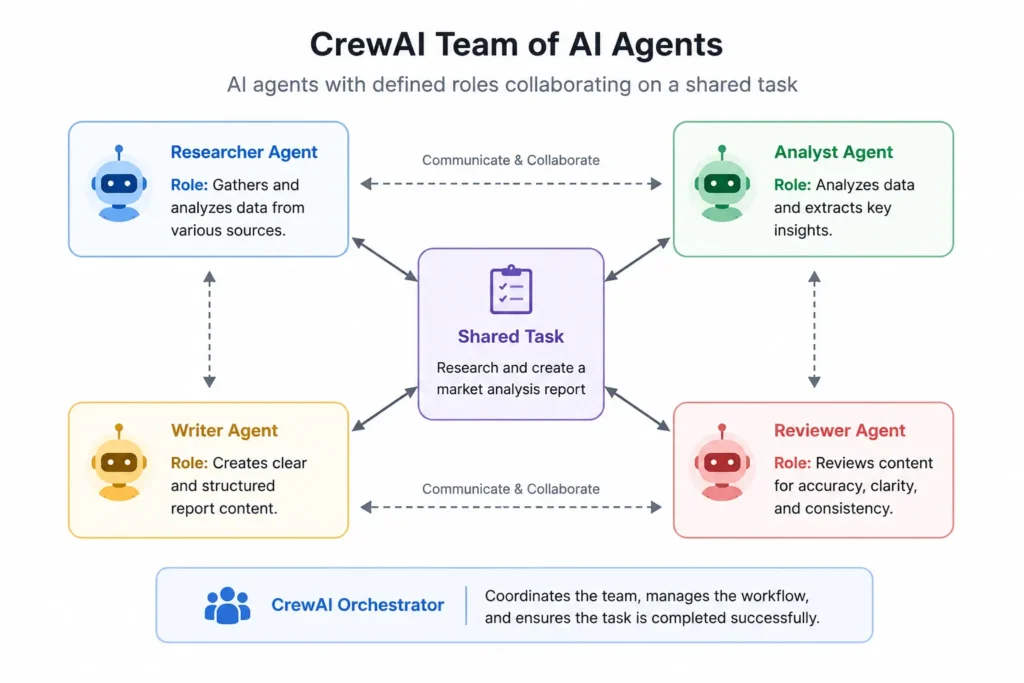
Before any setup, it helps to understand three simple building blocks that make up every project built with it.
Crews A crew is the overall team. It is the container that holds all your agents and coordinates them toward the final goal. Think of a crew as the department itself, like your marketing department or your editorial team.
Agents Each agent inside a crew has a role, a goal, and a backstory that shapes how it behaves. For example, an agent might be defined as “Senior Researcher” with the goal “find the most accurate and current information on the assigned topic.” This role definition shapes how the AI model responds, just like a job description shapes how a new employee approaches their work.
Tasks A task is a specific piece of work assigned to an agent. Tasks have a clear description of what needs to be done and what the expected output looks like. Tasks can depend on each other, meaning one agent’s task might require the previous agent’s task to be completed first.
Put simply: a crew is your team, agents are your team members, and tasks are the individual jobs each member completes.
To understand the large language models that give each agent its intelligence, our large language model guide breaks down the core technology in beginner terms.
How to Set Up CrewAI: The Lightest Version
It does require Python, similar to most multi-agent frameworks, but the setup itself is refreshingly simple.
Step 1: Install Python. If you do not already have it, download Python 3.10 or later from python.org. This is a standard software install, nothing technical beyond clicking next a few times.
Step 2: Install CrewAI Open your terminal or command prompt and type:
pip install crewaiPress enter. CrewAI downloads and installs in under a minute.
Step 3: Get an API key CrewAI needs an AI model to power its agents. You can use OpenAI’s GPT-4, Anthropic’s Claude, or several other providers. Sign up at platform.openai.com or console.anthropic.com and generate an API key.
Step 4: Define your first crew This is where you write a short description of your agents, their roles, and their tasks. The official documentation provides clear templates in its official documentation that you can copy and adapt rather than writing from scratch.
That is the entire setup. No complicated infrastructure. No advanced programming. If you can follow a recipe, you can follow this setup guide.
Your First CrewAI Crew: Plain English Walkthrough
Let us walk through what a simple CrewAI project actually looks like in practice, without diving into code syntax.
Imagine you want a small AI team to research a topic and produce a short blog post outline.
You define two agents. The first is named Researcher, to gather accurate, current information on whatever topic you give it. The second is named Outline Writer, with the goal of taking the Researcher’s findings and structuring them into a clear blog post outline with headings.
You assign one task to each agent. The Researcher’s task is to investigate the topic and produce a list of key facts and angles. The Outline Writer’s task depends on the Researcher’s task being completed first, so it waits, then takes that research and builds a structured outline.
You launch the crew with a single instruction, something like: “Research the benefits of intermittent fasting and create a blog post outline.”
The Researcher agent gets to work first, gathering information and producing a clear summary. Once finished, that summary is automatically passed to the Outline Writer agent, which builds a structured outline with headings, subpoints, and a suggested introduction.
You receive a finished, structured outline, produced by two AI agents who never needed you to manually copy and paste anything between them.
That is the framework doing exactly what it was designed to do.
Real Life Example 1: Podcast Production Studio in Austin, Texas
Meet Derek. He runs a small but growing business podcast out of Austin, Texas, interviewing startup founders twice a week. Producing each episode used to take him eight hours of prep and post-production work.
Derek builds a crew with four agents.
Guest Research Agent pulls background information on each upcoming guest, including their company history, recent news mentions, and notable achievements.
Interview Question Writer takes the research and drafts 15 thoughtful, specific interview questions tailored to that guest’s expertise and story.
Show Notes Agent after the episode is recorded and transcribed, this agent writes clear show notes summarising the conversation, with timestamps and key takeaways.
Social Clips Agent reviews the transcript and identifies the three most quotable, shareable moments, drafting short captions for each to post on Instagram and LinkedIn.
Derek’s eight hour prep and production workload drops to under two hours. He spends the time he saves actually focusing on the conversation quality during recording rather than scrambling through last minute research.
His podcast output doubled within two months. The crew did not replace Derek’s voice or personality on the show. It removed the repetitive production labour standing between him and more episodes.
Real Life Example 2: Law Firm in Chicago, Illinois
Meet Patricia, a partner at a small commercial law firm in Chicago specialising in contract review for small businesses. Her firm reviews dozens of vendor contracts every month, and the manual review process was eating into billable hours that could go toward higher value client work.
Patricia’s team sets up a workflow with three agents.
Contract Scanner Agent reads through uploaded contracts and flags clauses related to liability, termination conditions, payment terms, and any unusual or potentially risky language.
Plain English Summariser takes the flagged clauses and rewrites them in simple, jargon-free language that a non-lawyer client can actually understand.
Client Report Writer compiles the flagged issues and plain English summaries into a clean, professional report ready to send to the client, with a clear list of recommended negotiation points.
What used to take an associate two to three hours per contract now takes under 15 minutes, with a paralegal doing a final accuracy check before anything goes to a client.
Patricia’s firm now reviews contracts faster, charges clients less for the service while maintaining margins, and her associates spend their freed-up time on complex litigation work that actually requires deep legal judgment.
Real Life Example 3: Fitness App Startup in San Diego, California
Meet the team behind a small fitness app startup based in San Diego, California. They have 5,000 active users but only two people on staff, and personalising workout plans for every user manually is simply impossible at that scale.
They build a crew with three agents.
Data Analysis Agent reviews each user’s workout history, logged performance, and stated fitness goals from the app database.
Plan Personaliser Agent takes that analysis and generates a tailored weekly workout plan, adjusting intensity and exercise selection based on the user’s progress and preferences.
Motivation Coach Agent writes a short, personalised check-in message for each user at the start of their week, referencing their recent progress and encouraging them toward their specific goals.
This crew runs automatically every Sunday night, generating 5,000 personalised workout plans and motivational messages by Monday morning, something that would be entirely impossible for a two-person team to do manually.
User engagement and weekly active usage both increased noticeably after launching the personalised plans, because users felt like the app actually understood their individual journey rather than offering a generic template.
CrewAI Roles Explained: The Concept That Makes It Unique
The single most important concept that sets CrewAI apart from other frameworks is how seriously it treats agent roles.
When you define an agent, you give it three things: a role, a goal, and a backstory.
The role is the job title, like “Senior Financial Analyst” or “Creative Copywriter.”
The goal is the specific outcome that agent is responsible for, like “identify the three biggest financial risks in this report.”
The backstory is a short description of the agent’s expertise and approach, which shapes the tone and depth of its work, similar to how a senior employee with 15 years of experience approaches a task differently than someone brand new.
This role-goal-backstory structure is what makes CrewAI agents feel more like specialised team members and less like generic AI tools. A “Senior Financial Analyst” agent with a detailed backstory will produce noticeably more focused, professional output than a generic, undefined agent asked to do the same task.
Getting this role definition right is the single biggest factor in output quality, which is why our prompt engineering guide is genuinely useful preparation before building your first crew.
Integrating CrewAI With Other Tools
This framework becomes significantly more powerful when connected to other tools and platforms. Here are the most practical integrations:
CrewAI with OpenAI GPT-4: The most common setup. GPT-4 provides the reasoning and language capabilities for your agents, with strong general performance across most business use cases.
CrewAI with Claude (Anthropic): CrewAI supports Claude models as well, which many users prefer for tasks requiring careful, nuanced reasoning such as legal document review like Patricia’s law firm example. Our Claude tutorial for beginners is a helpful companion resource.
CrewAI with web search tools: You can equip agents with web search capabilities, allowing research-focused roles like Derek’s Guest Research Agent to pull live, current information rather than relying only on training data.
CrewAI with your own documents By giving agents access to your own uploaded files, contracts, customer data, or knowledge bases, they can reference your specific business context rather than generic information, exactly how Patricia’s firm processes real client contracts.
CrewAI with no-code automation platforms While the framework itself requires Python, its outputs can be connected to tools like Make.com and Zapier, allowing the results of a crew’s work to automatically trigger emails, update spreadsheets, or post to social media.
explore How to Build a No-Code AI Agent: From Zero to First Automation
Benefits and Limitations of CrewAI
Benefits:
Intuitive structure. The role-based design maps naturally onto how humans already think about teams, making it one of the easiest multi-agent frameworks to learn.
Fast to build. Because the role, goal, and task structure is so clear, building your first working crew typically takes less time than other multi-agent frameworks.
Flexible model support. It works with OpenAI, Anthropic Claude, and several other AI providers, giving you flexibility in cost and capability.
Strong for business workflows. The structured, sequential nature of CrewAI tasks maps very naturally onto real business processes like the ones used by Derek, Patricia, and the San Diego fitness team.
Limitations:
Still requires basic Python. While the setup is light, you do need comfort installing packages and editing simple configuration files.
Less suited to open-ended debate. If your task genuinely benefits from agents challenging and questioning each other’s reasoning, frameworks like Microsoft AutoGen handle that dynamic more naturally than this structured task flow.
API costs scale with complexity. More agents and more tasks mean more calls to your underlying AI model, which means costs grow with the sophistication of your crew.
xplore Claude API Tutorial for Complete Beginners: Best Hands-On Guide
Quality depends heavily on role definition. A poorly defined role with a vague goal produces noticeably weaker results, meaning the upfront thinking you put into defining your crew genuinely matters.
Frequently Asked Questions About CrewAI
What is CrewAI in simple terms?
CrewAI is a free, open-source framework that lets you build teams of AI agents, where each agent has a clearly defined role, goal, and task, working together like a well-organised department to complete complex work. It is one of the most beginner-friendly multi-agent AI frameworks available because its structure mirrors how real human teams already operate.
Do I need coding experience to use CrewAI?
You need basic comfort with Python, specifically installing packages and editing simple configuration files. You do not need software engineering experience. The official documentation provides clear templates that beginners can copy and adapt, making it one of the more approachable frameworks even for first-time users.
Is CrewAI free to use?
Yes. The framework itself is completely free and open source. You will pay only for API usage on whichever AI model powers your agents,
What can you build with CrewAI?
You can build research and content teams, contract and document review pipelines, personalised customer or user experiences at scale, podcast and media production workflows, and any business process that breaks naturally into distinct roles and sequential tasks. The three examples in this guide, a podcast studio, a law firm, and a fitness app, show just a fraction of what is possible.
How is CrewAI different from Microsoft AutoGen?
CrewAI focuses on clearly defined roles and structured task sequences, similar to a well-organised team with job titles. Microsoft AutoGen focuses on agent conversation and debate, similar to a brainstorming session. CrewAI tends to be faster to learn for beginners, while AutoGen tends to suit tasks that benefit from agents challenging each other’s reasoning.
What is the role-goal-backstory structure?
Every agent is defined by a role, which is its job title, a goal, which is the specific outcome it is responsible for, and a backstory, a short description of its expertise that shapes its tone and approach. This three-part structure is what makes agents feel like specialised team members rather than generic AI tools, and getting it right is the biggest factor in output quality.
Which AI models work with CrewAI?
It works with OpenAI models including GPT-4, Anthropic Claude models, and several other providers depending on your configuration. This flexibility allows you to choose based on cost, capability, and the specific reasoning style your use case requires.
Where can I learn more about CrewAI?
The best starting point is the official CrewAI documentation, which includes templates and examples for common use cases. Explore our What Is Retrieval Augmented Generation (RAG)? A Beginner’s Guide With Real Life Examples and Microsoft AutoGen guide provide useful comparison points before you decide which framework fits your needs.
Explore more articles: AI Agents: Earn money with AI: Blogs
Sunscrobe to AI Pathway Lab for more daily AI updates