Table of Contents
Learning how to build a no-code AI agent is quickly becoming one of the most valuable skills in today’s AI-driven world.
The first time I built a no-code AI agent, I honestly didn’t expect it to work this well – it completely surprised me.
I am a techie. I understand systems, workflows, and processes. But even with that background, what surprised me most was how quickly everything came together.
Within a few hours of starting to build a no-code AI agent, I had something running that was genuinely doing work on my behalf — checking things, responding to inputs, and taking actions.
And then I left it running overnight.
The next morning, it had done everything I set it up to do, without me, without stopping, and without getting tired.
That moment completely changed how I think about work.
And the best part? You don’t need to write a single line of code to build no-code AI agent workflows that actually deliver real results.
If you’ve been wondering whether you can really build a no-code AI agent and get meaningful outcomes, this guide will give you the complete answer — with real examples, free tools, and a step-by-step workflow you can follow starting today.
Read our complete guide on What Are AI Agents to understand the full landscape before you build a No-Code AI Agent experience required.
What Is an AI Agent? Everything You Need to Know Before You Build a No-Code AI Agent
Before you build a no-code AI agent, it’s important to be completely clear on what an AI agent actually is.
An AI agent is a system that can reason, plan, and take actions on its own based on the goal you give it.
Think of it like a digital employee. You tell it what you need to be done, it figures out the steps, uses the tools available to it, makes decisions along the way, and completes the task without you being involved in every step.
The good news is that you can build a no-code AI agent without any coding skills, using modern visual platforms that handle all the technical complexity for you. Everything is drag-and-drop, everything is visual, and everything in this guide is free to start.
This is genuinely different from anything that existed in software before large language models arrived. And it is why learning to build a no-code AI agent is such a powerful skill right now.
AI Agent vs Automation: Key Difference Before You Build a No-Code AI Agent
An AI agent is a system that can reason, plan, and take actions on its own based on the goal you give it.
Think of it like a digital employee. You tell it what needs to be done, it figures out the steps, uses the tools available to it, makes decisions along the way, and completes the task without you being involved in every step.
The good news is that you can build a no-code AI agent without any coding skills, using modern visual platforms that handle all the technical complexity for you. Everything is drag-and-drop, everything is visual, and everything in this guide is free to start.
This is genuinely different from anything that existed in software before large language models arrived. And that is why learning to build a no-code AI agent is such a powerful skill right now.
| Automation | AI Agent |
|---|---|
| Fixed predefined steps | Dynamic flexible reasoning |
| Same output every time | Adapts based on context |
| No decision making | Makes decisions independently |
| Fast for simple tasks | Powerful for complex tasks |
The rule is simple. If your task is repetitive and always follows the same steps, use automation. If your task requires thinking, decision-making, or adapting to different situations, you need to build a No-Code AI agent workflow that can reason dynamically.
Three Components You Need to Build a No-code AI Agent
Every time you build a No-code AI agent, you are connecting the same three components regardless of how simple or complex your use case is.
Understanding these makes the entire process far less intimidating.
The Brain: First Component to Build a No-Code AI Agent
The brain is the large language model powering your agent. Choosing the right brain is the first decision you make when you build a No-Code AI Agent workflow from scratch.
This is the AI model that handles all the reasoning, planning, and language understanding. Common choices include Claude by Anthropic, ChatGPT by OpenAI, and Google Gemini.
Different models have different strengths. Claude is exceptional for writing, analysis, and nuanced understanding, making it ideal when you build a no-code AI agent system for content or QA tasks. ChatGPT is strong for general tasks and coding. Gemini integrates well with Google Workspace tools.
Memory: Second Component to Build a No-Code AI Agent
When you build a No-Code AI Agent for the first time, simple memory is all you need to get started.
Memory gives your agent the ability to remember context across a conversation or workflow. Without memory, your agent forgets everything after each interaction and cannot build on previous steps.
There are two types worth knowing. Short-term memory keeps track of the current session. Long-term memory connects to external sources like documents, spreadsheets, or databases the agent can reference whenever needed.
Tools: Third Component to No-Code AI Agent
The tools you connect determine what your agent can actually do once you build a No-Code AI Agent system that is live.
Tools are how your agent interacts with the outside world. Without tools, your agent can only think and talk. With tools, it can actually do things.
Tools fall into three categories. Retrieving data means pulling information from external sources. Taking action means doing things like sending emails, creating calendar events, or updating databases. Orchestration means calling other agents or chaining multiple actions together.
Common tools include Gmail, Google Calendar, Google Sheets, Slack, Microsoft Teams, Notion, and hundreds of others.
What You Can Build When You Build a No-Code AI Agent
Here are real things professionals are building when they build AI agent, no coding experience required today.
A QA testing agent that reads your requirements documents, generates comprehensive test cases, identifies edge cases, and delivers a complete testing package while you focus on higher-value work.
A content creation agent that researches a topic, drafts a blog post, suggests internal links, and saves everything to a Google Doc ready for your review.
A customer support agent that reads incoming queries, checks your knowledge base for relevant answers, drafts responses, and escalates anything it cannot handle confidently.
A meeting notes agent that receives your meeting transcript, extracts key decisions and action items, assigns them to the right people, and updates your project management tool automatically.
A lead qualification agent that receives new inquiries, asks qualifying questions, collects contact details, and books discovery calls into your calendar.
None of these requires coding. All of them run continuously without you being present. Read our guide on AI Agents: How to Earn Money While You Sleep with Automation- 3 Proven Ways to understand how workflows connect to agent systems when you build AI agent no coding pipeline.
The Best Free Platform to Build a No-Code AI Agent: Why We Recommend n8n
n8n is our top recommendation when you want to build a No-code AI agent skills needed because it is completely free, open source, and visual.
The drag and drop interface means you can build a No-code AI agent with the knowledge required by connecting visual blocks called nodes. Each node represents a specific step or tool. You connect them together, and your agent comes to life.
n8n has a dedicated AI agent node that gives you direct spots to connect your brain, your memory, and your tools all in one place. It comes with pre-built integrations for Google Workspace, Microsoft 365, Slack, Notion, Reddit, and hundreds of other services.
Other platforms worth knowing when you build a No-code AI agent workflow:
| Platform | Best For | Cost |
|---|---|---|
| n8n | Full agent builds open source | Free |
| Make.com | Visual no-code workflows | Free plan |
| Power Automate | Microsoft workplace integration | Free basic |
| Zapier | Connecting apps quickly | Free plan |
For your first attempt at a no-code AI agent experience needed start with n8n. Once you understand the concepts, everything else becomes much easier.
Step by Step: How to Build a No-code AI Agent Required
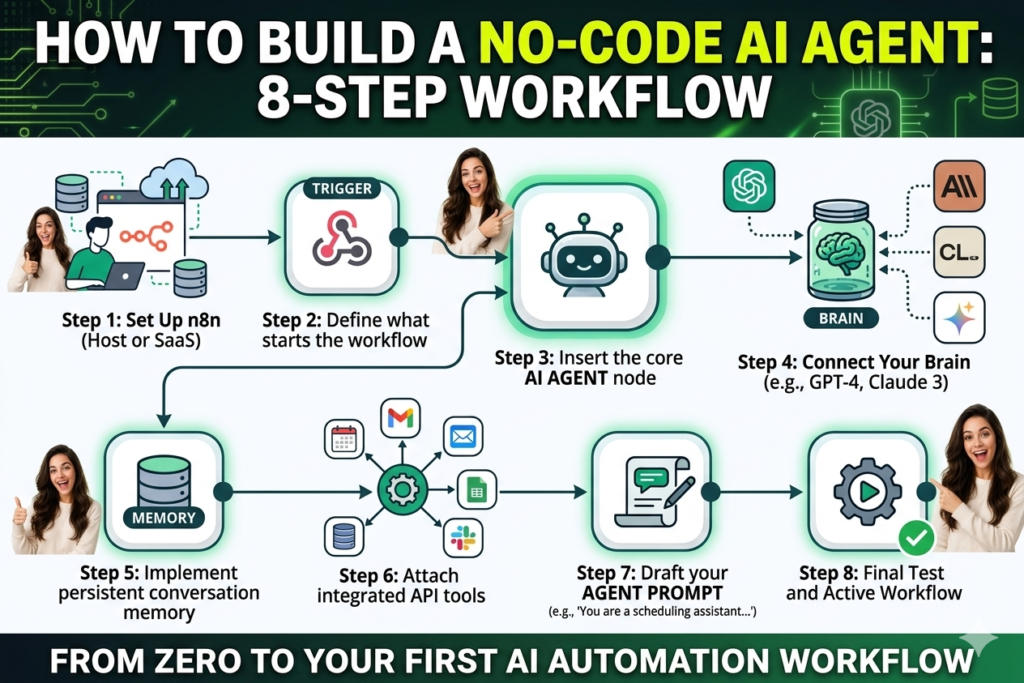
Follow these exact steps to build a No-code AI agent experience needed for your first working QA testing agent.
We will create a QA Testing Agent that reads a feature requirement and automatically generates comprehensive test cases. This is genuinely useful for any software tester and takes under two hours. No-code AI agent skills required.
Step 1: Set Up n8n to Build a No-code AI Agent
This is your starting point to build a no-code AI agent required on the n8n platform.
Go to n8n.io and create your free account. Use their cloud version, which requires no installation. Once inside, click Create New Workflow. This is your blank canvas where you will build a no-code AI agent workflow visually.
Step 2: Add Your Trigger
Every agent needs a trigger, the event that starts it running. Click Add First Step and select Webhook trigger. This means your agent activates whenever it receives a request, like when someone submits a new feature requirement. Give your webhook a name and save it.
Step 3: Add the AI Agent Node
Click the plus button to add a new node. Find the AI section and select AI Agent. This is the heart of your entire No-code AI agent workflow, where everything connects together.
Step 4: Connect the Brain
In the AI Agent node, click the plus icon next to Chat Model. Select Claude by Anthropic for QA tasks because it produces exceptionally detailed and accurate test case outputs.
Click Create New Credentials and enter your Claude API key from anthropic.com. Save your credentials. Your brain is now connected and ready to power your build AI agent, no coding system.
Step 5: Add Memory
Click the plus icon next to Memory. Select Simple Memory. Set the context window to 5 meaning your agent remembers the last five messages in the current session. This is perfect for a single workflow run when you build a No-code AI agent beginner project.
Step 6: Connect Your Tools
Now we add the tools that make your No-code AI agent QA agent genuinely powerful.
Tool 1: Google Sheets Connect Google Sheets to give your agent access to your requirements database. Sign in with Google, approve permissions, and select your requirements spreadsheet.
Tool 2: Gmail Connect Gmail so your agent can send the generated test cases directly to your inbox or your team. Sign in with Google and approve permissions.
Tool 3: Google Docs via HTTP Request. Add an HTTP Request node to connect to the Google Docs API. This allows your agent to save the complete test case document directly to your Drive automatically when you use a no-code AI agent pipeline.
Step 7: Write Your Agent Prompt
Your prompt is what transforms your build a No-code AI agent setup into a genuinely intelligent system.
This is the most important step. Your prompt tells the agent exactly what to do with all the tools it has access to.
Here is an effective prompt for your QA testing agent:
You are a senior QA engineer with 10 years of experience in software testing.
When given a feature requirement, create a full test case document.
First, identify:
- Core functionality
- User scenarios
- Business rules
Then generate:
- Positive test cases (happy paths)
- Negative test cases (invalid inputs, errors, boundaries)
- Edge cases (unusual scenarios)
- Integration dependencies
Format everything in a table with:
Test Case ID, Category, Description, Preconditions, Steps, Expected Result, Priority.Finally, send the report via Gmail and save it in Google Docs.
In the No-code AI agent, change the prompt source to Define Below and paste this prompt in. Your agent now knows exactly what to do.
Step 8: Test Your Build No-code AI Agent Workflow
Testing is the most important final step in your No-code AI agent journey.
Click Test Workflow. If you get an error, which is completely normal on first runs, screenshot it and paste it into Claude or ChatGPT and ask how to fix it. The error message itself usually contains most of the information needed to solve the problem.
Run the test again. When it completes successfully, check your Gmail inbox for the generated test cases and verify that the Google Doc was created correctly.
Your first No-code AI agent workflow is now working. 🎉
Real World Example: Content Creation Agent Build a No-code AI Agent
Sarah used the exact same approach to No-code AI agent experience needed for her content workflow.
A content creator based in Chicago used to spend four hours every week researching topics, drafting outlines, and writing first drafts for her AI blog. She decided to build a No-code AI agent system using n8n in an afternoon.
Her agent uses Claude as the brain, simple memory for the session, and three tools. Web search for research, Google Docs for saving drafts, and Gmail for sending notifications when drafts are ready.
Now she gives her agent a topic at the start of the week. The agent researches the topic, generates an outline, writes a complete first draft, saves it to Google Docs, and emails her to say it is ready for review.
Four hours of work now takes twenty minutes of her time reviewing and personalising the draft. The structure is always the same when you build a No-code AI agent system for any use case. Brain plus memory plus tools equals a working agent. Only the prompt and the specific tools change based on what you need.
This is the power you unlock when you build a No-code AI agent. Skills required. The same simple framework works for any workflow in any industry.
Common Mistakes When You Build a No-code AI Agent for the First Time
These are the mistakes most beginners make the first time they build a no-code AI agent workflow. Avoiding them will save you hours of frustration.
Vague prompts produce vague results. When you build a No-code AI agent system, your prompt is the most important element. Too general, and your agent produces generic, unhelpful outputs. Specific detailed prompts that explain the role, the task, the tools, and the expected output produce dramatically better results.
Skipping the testing phase. Always test your agent thoroughly before relying on it for real work. Test normal inputs, unusual inputs, empty inputs, and edge cases. Your testing background is a genuine advantage when you build a no-code AI agent QA workflow.
Not adding guardrails. For personal use, this matters less. But if your agent interacts with customers or external systems, always add rules about what it should not do when you build a No-code AI agent production system.
Over-complicating the first build. Start with the simplest version that works when you build a No-code AI agent for the first time, without coding. One trigger, one agent node, two or three tools. Get that working perfectly before adding complexity.
Not saving regularly. Save your workflow after every significant change when you build an AI agent no-coding project. n8n has auto-save, but do not rely on it exclusively.
Guardrails: Keeping Your Agent Safe When You Build a No-code AI Agent
Guardrails become more important as you build a No-code AI agent systems that interact with external users or important business data.
Without guardrails your agent can make unexpected decisions, get stuck in loops, or take actions that cause problems. For a personal QA testing agent, the risks are low. But as you build a No-code AI agent workflows that send emails on your behalf or modify important documents, guardrails become essential.
The most effective guardrails when you build a no-code AI agent system include telling the agent exactly what it is not allowed to do, specifying when it should ask for human approval before taking action, defining how it should handle requests outside its scope, and setting clear output format requirements.
Read our guide on Prompt Engineering for QA Agents – Best Practices Complete Guide to understand how to write effective guardrails and instructions for your agents.
Tools and Resources to Build a no-code AI agent Today
These are the tools you need to build AI agent no coding required from scratch today.
| Tool | Purpose | Link |
|---|---|---|
| n8n | Build and run AI agents visually | n8n.io |
| Claude API | AI brain for your agent | anthropic.com/api |
| Anthropic Academy | Free courses on Claude and agents | anthropic.skilljar.com |
| Make.com | Alternative visual workflow builder | make.com |
| Power Automate | Microsoft workplace integration | powerautomate.microsoft.com |
| OpenWeatherMap | Free weather API for practice builds | openweathermap.org |
| Google Cloud Console | Connect Google services to your agent | console.cloud.google.com |
| Zapier | Connect apps without coding | zapier.com |
Frequently Asked Questions About Build a No-code AI Agent
Do I really need zero coding skills to build a No-code AI Agent workflow?
Yes completely. Platforms like n8n use a visual drag-and-drop interface where you connect blocks representing different steps and tools. Writing a good prompt for your agent requires clear thinking and communication skills, not coding. Many of the most effective people who build No-code AI Agent systems have no programming background at all.
How long does it take to build a No-code AI agent for the first time?
A simple single-purpose agent like the QA testing example in this guide typically takes two to four hours to build a No-code AI Agent experience needed on your first attempt. Once you understand the core concepts, your second agent takes half the time. Most beginners have a working agent within a single weekend of focused effort.
Is n8n really free to build a No-code AI Agent?
Yes. n8n is open source and completely free to self-host. They also offer a cloud version with a free trial that gives you generous usage for testing and learning. For most beginner builds, the free tier is more than sufficient to build a No-code AI Agent first project. Visit n8n.io to get started.
Can I build a No-code AI agent for my QA testing workflow specifically?
Absolutely. QA testing is one of the most powerful use cases when you build a No-code AI Agent system because so much of testing work involves repetitive structured tasks like test case generation, regression checklists, and bug report documentation. Your existing testing expertise makes you exceptionally well-positioned to build effective QA agents quickly.
What is the difference between an AI agent and a chatbot?
A chatbot responds to questions and follows predefined conversation flows. When you build a No-code AI Agent system, you create something that takes real actions in the world using external tools. A chatbot tells you the weather. An AI agent checks your calendar, looks at the weather forecast, reviews your requirements, and sends you a personalised recommendation. The key difference is autonomous action versus conversation.
Conclusion
Building a no-code AI agent is one of the most accessible and valuable skills you can learn right now.
The core idea is simple: brain, memory, and tools. The platforms are visual, mostly free, and deliver results quickly.
Everything you need is already available today and explained in this guide.
What surprised me most about building my first agent was not just what it could do, but that it kept working nonstop — no breaks, no fatigue, just consistent execution.
That experience completely changed how I think about what one person can achieve with the right systems.
Start with a QA testing agent or a content creation agent. Get one working, then build the next.
Because the gap between people who build no-code AI agent workflows and those who only talk about them is widening every month. And the entry point has never been lower than it is right now.
Your first no-code AI agent workflow is just one afternoon away. Go build it.
For more guides on AI agents and automation, visit AI Pathway Lab and explore our complete resources:
- AI Learning Hub
- AI Workflows for QA Automation: How to Integrate
- Prompt Engineering for QA Agents – Best Practices Complete Guide
- How to Earn Money While You Sleep Using AI Agents
- AI Agents
- 5 AI Tools to Save Time and Earn Money
Written by AI Pathway Lab — practical guides for building real AI skills and real income.
Explore everything at aipathwaylab.com