Table of Contents
Create AI Logos, Every business that exists online needs a logo somewhere: on a website header, an app icon, a social media profile, a product label. That demand has not gone anywhere, but the tools available to meet it have changed a lot in a short time. A few years ago, a decent logo meant hiring a designer and waiting a week for a handful of concepts. Today, AI tools can generate dozens of usable directions in minutes, which opens the door for someone with a good eye and a bit of design sense to turn that speed into an actual business, without needing years of formal design training first.
This guide walks through what an AI logo business actually looks like, the tools worth using, how to write prompts that produce something usable instead of generic, and the practical side of turning this into paid work: pricing, platforms, and the mistakes that trip up almost everyone starting out. By the end, you should be able to create AI logos with confidence and turn that skill into real client work.
What an AI Logo Business Actually Is
An AI logo business uses AI tools to generate logo concepts, explore color palettes, produce variations quickly, and put together a full small business branding package, rather than starting every project from a completely blank page. Learning to create logos well is really about combining speed with judgment, since the AI is not doing the whole job. It is doing the slow, exploratory part fast, so a human with an eye for what actually works can spend their time refining and finishing rather than generating dozens of rough sketches by hand.
That distinction matters more than it might seem. A client paying for a logo is paying for a result that looks intentional and fits their brand, not for proof that no software touched the process. Whether AI helped along the way is rarely the question a paying client actually cares about, which is exactly why learning to create logos well pays off regardless of how a designer feels about AI in general.
How to Create AI Logos, Step by Step
Step 1: Understand the Brand Before Opening Any Tool
Skipping straight to generating images is the single fastest way to end up with a pile of forgettable logo concepts. Before you create logos for any client, it helps to nail down the business name, the industry, the target audience, the brand’s personality, any color preferences already in mind, and a general style direction.
A short brief like “modern coffee shop targeting young professionals” already tells an AI tool far more than no brief at all, and it gives you, the person doing the work, a clear standard to judge the output against later. Getting this step right before you create AI logos for a client is what separates a smooth project from one full of revision requests.
Step 2: Create Logos by Generating a Range of Concepts
Different tools are good at different parts of this process, and using multiple tools in combination tends to produce better results than relying on a single tool for everything when creating AI logos.
ChatGPT is genuinely useful here, not for generating the final image, but for brainstorming naming directions, tagline ideas, and detailed prompt text to feed into an image generator. Midjourney tends to produce the most creative, visually interesting concept directions, which makes it a strong starting point for exploring what a brand could look like before narrowing anything down.
Adobe Firefly is a solid choice for generating clean, commercially usable visuals, since Adobe designed it specifically with commercial licensing in mind, which matters more for client work than it might for personal projects. Canva AI is where most of the finishing work happens once you create AI logos with the other tools: cleaning up a concept, adjusting colors, and producing the final files a client actually needs.
Anyone wanting a deeper understanding of how these image generation tools actually work under the hood can find that background in this overview of generative AI.
Step 3: Write Prompts That Actually Produce Something Usable
This is where most beginners lose the most time when they try to creating logos for the first time. A prompt like “create a modern logo for a coffee brand” is so vague that the AI has to guess at almost everything, and the result usually looks like it. Compare that to something like: “create a minimalist modern logo for a specialty coffee brand called Urban Bean, using clean typography, warm colors, a premium feel, a simple icon, suitable for both packaging and social media.” The second version tells the tool exactly what matters, and the difference in output quality is not subtle.
Read Prompt Engineering Guide – The Skill That Makes You 10x Faster
Best AI Tools to Create AI Logos
| Tool | Best for |
|---|---|
| Canva AI | Beginners, and finishing and editing existing concepts |
| Adobe Firefly | Clean, commercially usable brand visuals |
| Midjourney | Creative, exploratory logo concepts |
| ChatGPT | Naming ideas, taglines, and writing better prompts |
| Looka | Fully automated logo and brand kit generation |
Looka in particular is worth knowing about separately from the others, since it is built specifically to create AI logos rather than general image generation. It walks a user through a guided process, asking about style and industry, then generates a full set of logo options along with a brand kit, color variations, and social media templates. For someone offering a fast, budget friendly logo package, Looka can be a genuinely useful starting point rather than a competitor to worry about, since plenty of clients still want a human involved in refining and customizing whatever comes out of it.
Different Ways to Create Logos for Different Clients
Business logos, aimed at startups, small businesses, and local shops, are the most common request and usually the most straightforward, since the client typically already has a name and at least a rough sense of their industry, which makes this the easiest category to creating logos for when you are just starting out.
Personal brand logos, built for coaches, creators, and consultants, tend to need a more personal touch, often built around initials, a signature style, or something that reflects the individual rather than a generic company. This is one of the trickier categories to creating AI logos for well, since the result needs to feel personal rather than templated.
YouTube channel logos and other creator-focused work reward a slightly bolder, more attention -grabbing style, since they need to work as a small, cropped circle on a screen full of other channels competing for the same click. Creators are often repeat clients too, coming back every time they rebrand or launch a new series, which makes this a good category to specialize in once you can reliably create AI logos that fit a creator’s specific personality.
Product logos, for ecommerce brands and digital products specifically, need to hold up at very small sizes, since they will often show up as a tiny icon on a packaging label or an app store listing long before anyone sees it at full size. It is worth testing every logo concept shrunk down to the size of a phone icon before calling it finished when you are creating AI logos for this category, since a design that looks great as a large image can turn into an unreadable blur once it is small enough to sit next to a dozen other app icons on someone’s home screen.
How to Sell the AI Logos You Create
Freelance platforms like Fiverr, Upwork, and Freelancer are the fastest way to find a first client, typically structured around a basic logo package, a more complete branding package with color variations and file formats included, and an add-on social media kit. This is often the fastest path to your first paying work once you can reliably create logos that look finished rather than rough. For anyone building out a freelance practice more broadly rather than just logo work specifically, this guide to Build an AI Automation Agency Using Claude AI: Beginner to Pro Guide covers the platform side of things, including what Upwork and Fiverr’s actual AI content policies say, in more depth than is worth repeating here.
Direct outreach to small local businesses, restaurants, coaches, and new startups is a second path that avoids competing on price with dozens of other freelancers on a marketplace. Marcus, a former retail manager in Tulsa, started by offering to create logos for free as a refresh for three local businesses he already had a relationship with, then used those as real, local case studies to land paying clients in the same area over the following few months.
Selling logo templates as a digital product, rather than one-on-one client work, is a third option worth considering once a portfolio exists. Industry specific template collections and full brand kits, sold through a personal website or a digital marketplace, can generate income without needing to create logos from scratch for every single customer, though this path generally takes longer to build real momentum than direct client services. A collection built around one specific niche, such as templates aimed specifically at coffee shops or yoga studios, tends to sell better than a broad, generic pack, since a buyer searching for something in their exact industry is far more likely to convert than someone browsing a general design marketplace.
What to Actually Charge Once You Create Logos for Clients
Pricing here varies enormously based on experience, market, and what exactly is included, but a rough shape looks like this. Simple logo concepts from a beginner typically run somewhere between twenty and a hundred dollars. A logo paired with a basic brand package, including color variations and a few file formats, moves into the hundred to five hundred dollar range once there is a bit more experience and a real portfolio behind it. Full branding packages, covering a complete visual identity system rather than just a logo, start around five hundred dollars and go up from there for more established designers.
These numbers shift a lot depending on the specific market and client, so treat them as a rough starting point rather than a fixed rate card. Someone who can consistently create AI logos that clients love without heavy revision requests will naturally move up this range faster than someone still relying on trial and error for every project.
A Simple Workflow to AI Logos Every Time
AI logo workflow
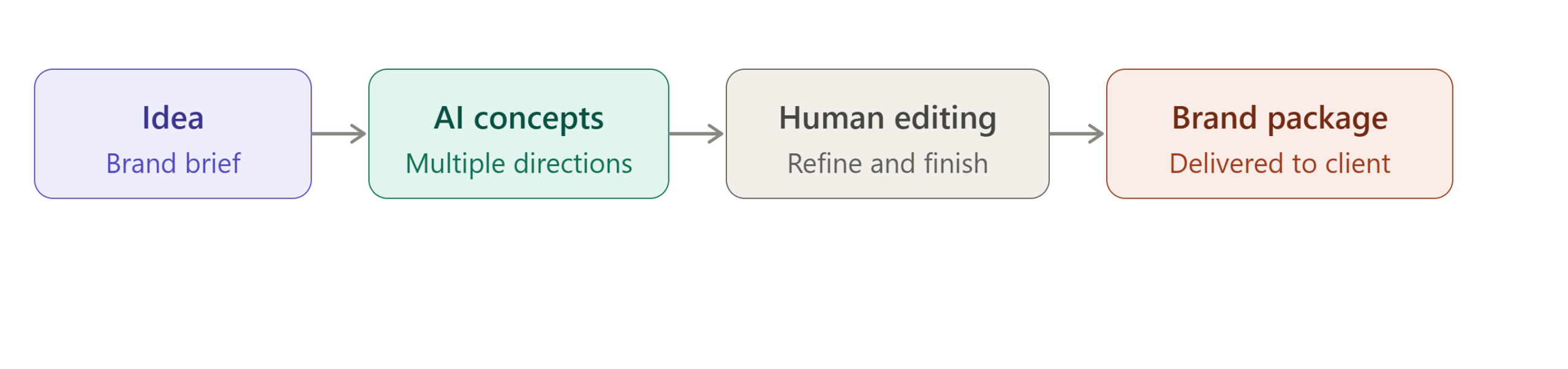
Keeping this workflow consistent across projects, rather than improvising a different process each time, is what makes it possible to AI logos at scale and actually move past one client at a time.
Common Mistakes to Avoid When You’re Creating AI Logos
Using raw AI output without any editing is the mistake clients notice fastest, since an unedited AI logo often has small inconsistencies, awkward spacing, or a slightly off feeling that a trained eye catches immediately even if they cannot say exactly why.
Producing generic, forgettable logos because the brief was skipped or rushed is a close second, and it is almost always traceable back to skipping Step 1 rather than a tool limitation when you try to create logos too quickly. A logo that could belong to literally any coffee shop or any consulting firm has usually skipped the part where the brand’s actual personality gets factored into the design at all.
Ignoring brand research entirely, delivering something that technically looks fine but does not fit the client’s actual industry or audience, damages trust even when the design itself is competent.
Not checking for potential trademark conflicts before finalizing a design is a real risk worth taking seriously; anyone who plans to create AI logos professionally should build a quick search through the USPTO’s trademark database into their process before delivering a final logo, especially one built around a distinctive name or symbol, as a cheap safeguard against a client running into a legal problem down the line.
Finally, delivering only a single low resolution file, rather than the full set of formats a client actually needs for web, print, and social media, is a small thing that creates an outsized amount of client frustration after the fact, usually showing up as an awkward follow-up message days after the project was supposedly finished. Anyone serious about learning to create logos as an actual service should treat a complete file handoff as part of the job, not an optional extra.
A Quick Checklist Before You Deliver
A short review pass before sending a final logo to a client catches most of the problems covered above in one pass. Check that the concept was actually built around the client’s brief rather than a generic direction, since this is the fastest way to tell whether you took the time to create AI logos that fit the brand or just picked whatever looked decent first. Shrink the logo down to icon size and confirm it still reads clearly, since a design that only works at full size will cause problems the moment it becomes a tiny app icon or social media avatar.
Run the name or symbol through a quick trademark search if it has any distinctive element worth protecting, and make sure the client is getting a full set of file formats rather than a single image. Finally, look at the finished result with fresh eyes after stepping away for a few minutes, since it is much easier to spot a flaw in something you create AI logos for after a short break than in the moment right after generating it.
Final Thoughts
AI has genuinely changed how fast a logo can go from an idea to a finished, professional-looking result. However, the business itself still depends on the same fundamentals that have always mattered. Understanding a brand, having an eye for what looks intentional rather than generic, and treating every AI-generated concept as a starting point instead of a finished product remain essential.
Anyone who wants to create logos as a real service is better served by learning to write clear prompts, refining AI-generated designs, and exploring a broader toolkit rather than relying on a single tool that promises to do everything automatically.
For a wider look at how logo design fits into the growing AI economy, explore our pillar guide on 100 AI-Powered Income Systems. It covers AI logo design as one of ten major income categories and shows how creating AI logos can become part of a broader portfolio of AI-powered services and revenue streams.
Read More From AI Pathway Lab, AI Automation & Workflows
What Is Agentic AI? How AI Agents Are Changing Work, Business, and Careers (With Real-Life Examples)
How to Build a No-Code AI Agent: From Zero to First Automation
10 AI Agent Tools Must Try in 2026 – Stop Wasting Time Without Them
Faceless YouTube Automation with Claude AI: Complete Money-Making Workflow Guide
Explore Blogs Earn Money with AI
Frequently Asked Questions
Do I need design experience to create AI logos professionally?
Some visual sense helps a lot, but formal design training is not strictly required to creating AI logos that clients are happy with. What matters more is understanding brand basics, writing clear prompts, and having the judgment to know when an AI generated concept actually works versus when it needs real editing
Which AI tool is best when I want to create logos as a complete beginner?
Looka or Canva AI are the most approachable starting points, since both are built around a guided process rather than requiring the more open-ended prompting skill that Midjourney rewards. Most people eventually use a combination of tools rather than relying on just one to create AI logos. read full article AI Art Side Hustle: 7 Proven Ways to Make Money with Midjourney AI-Generated Images
How do I avoid a generic result when Iam creating AI logos?
Spend real time on the brand brief before generating anything, and treat the first batch of AI concepts as a starting point rather than a finished product. Editing, refining, and combining ideas from multiple generated concepts almost always beats picking the first decent looking output and calling it done.
Can I get in legal trouble using AI to create logos for clients?
Anyone who wants to creating logos for paying clients should know the main risk is delivering a logo that unintentionally conflicts with an existing trademark, which a quick search through the USPTO’s public database can help catch before it becomes a problem. It is also worth being clear with clients about who owns the final design and confirming that upfront in any service agreement.
How much can a beginner realistically expect to earn?
A beginner starting with simple logo concepts can realistically charge in the twenty to hundred dollar range per project while building a portfolio around their ability to create AI logos well. Income grows from there as a track record builds, both through repeat clients and the ability to charge more for fuller branding pack