- What Is an AI Workflow?
- Traditional Workflow
- AI Workflow
- Why AI Workflows Matter Today
- Popular AI Tools Used in Workflows
- 1. OpenAI ChatGPT
- 2. Anthropic Claude AI
- Canva
- 4. Notion Labs Notion AI
- 5. Automation Platforms
- Simple AI Workflow Example for Beginners
- AI Workflow for Blog Content Creation
- Step 1: Idea Generation
- Step 2: Research & Structure
- Step 3: Human Writing + AI Support
- Step 4: Image Creation
- Step 5: Social Media Promotion
- For Students
- For Content Creators
- For Software Professionals
- For Small Businesses
- Beginner Mistakes in AI Workflows
- 1. Depending Completely on AI
- 2. Using Too Many Tools at Once
- 3. Ignoring Content Quality
- How Beginners Can Start Learning AI Workflows
- Beginner AI Workflow Starter Plan
- Week 1
- Week 2
- Week 3
- Week 4
- Why AI Workflows Will Become More Important
- Final Thoughts
AI Workflow Tools are changing everything about how we work in 2026.
A few years ago, productivity meant working harder. Longer hours. More effort. More stress.
Today, productivity increasingly means working smarter — and that is exactly where these tools are changing everything.
People are no longer using AI just to ask random questions or generate captions. They are automating entire processes, eliminating repetitive tasks and reclaiming their time for work that actually matters.
In this post we cover 5 tools that are replacing manual work completely — whether you are a freelancer, professional, business owner or complete beginner.
They are now building complete systems where AI helps automate:
- content creation
- research
- email writing
- social media planning
- coding tasks
- business operations
- customer support
- learning processes
And honestly?
For beginners, it sounds much more complicated than it actually is.
The truth is:
You do not need to be an AI engineer to start using AI workflows.
You simply need to understand:
- What workflows are
- How AI tools connect together
- How automation saves time
- How to use AI practically in daily life
This guide explains AI workflows in a simple, beginner-friendly, human way — with real examples people can actually use.
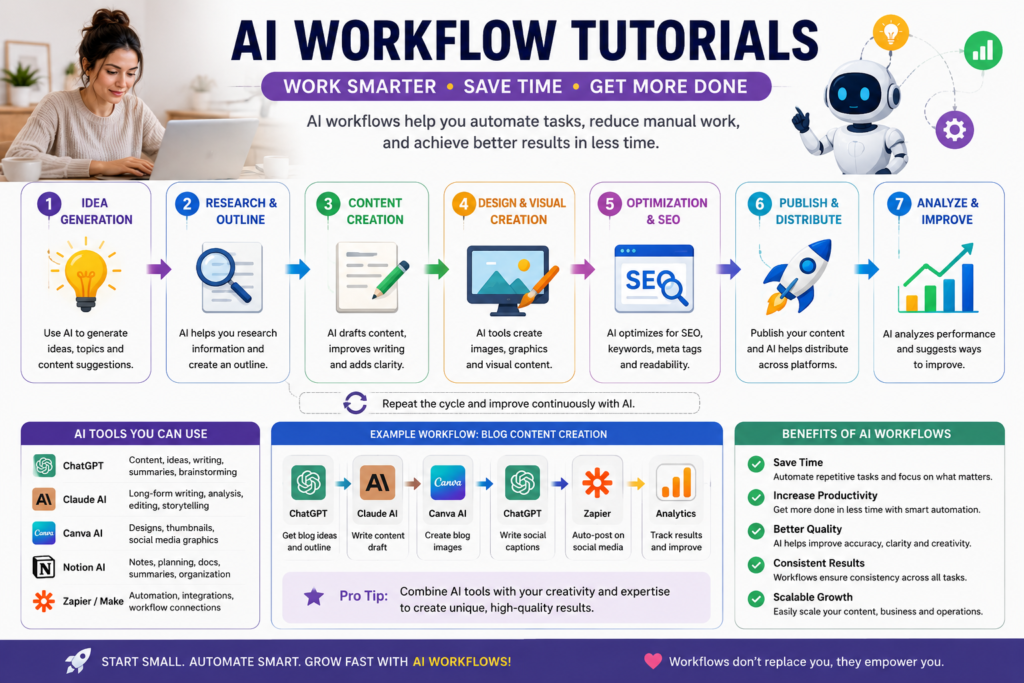
What Is an AI Workflow?
An AI workflow is a step-by-step process where AI tools help complete tasks automatically or more efficiently.
Think of it like building a digital routine.
Instead of manually doing everything yourself, AI assists with different parts of the process.
For example:
Traditional Workflow
- Think of a content idea
- Research topic
- Write article
- Create image
- Write a social caption
- Publish manually
This could take many hours.
AI Workflow
Using AI tools:
- AI suggests ideas
- AI helps research
- AI drafts article structure
- AI generates images
- AI creates captions
- Human reviews and publishes
Same goal.
But faster and more organized.
Why AI Workflows Matter Today
People often think AI is only for tech experts.
But AI workflows are now helping:
- students
- bloggers
- marketers
- software professionals
- small business owners
- content creators
- freelancers
Save significant time.
The biggest advantage is not replacing humans.
It is reducing repetitive work.
That allows people to focus more on:
- creativity
- decision-making
- strategy
- learning
Popular AI Tools Used in Workflows
Different AI tools have different strengths.
Here are some beginner-friendly tools commonly used.
1. OpenAI ChatGPT
Best for:
- brainstorming
- outlines
- coding help
- quick explanations
- content ideas
Example:
“Generate 10 blog topic ideas about AI productivity.”
2. Anthropic Claude AI
Best for:
- long-form writing
- storytelling
- summaries
- natural writing flow
Example:
“Rewrite this article in a more human tone.”
Canva
Best for:
- social media graphics
- presentations
- thumbnails
- AI-assisted design
Example:
Creating Instagram carousel posts quickly.
4. Notion Labs Notion AI
Best for:
- organizing ideas
- productivity systems
- project planning
- notes
Example:
AI-generated meeting summaries or content planning.
5. Automation Platforms
Tools connect workflows together.
Popular examples:
- Zapier Zapier Zapier Try for free
- Make Make Try Here
These tools automate repetitive actions between apps.
Example:
When a blog is published → automatically share it on social media.
Simple AI Workflow Example for Beginners
Let’s look at a real beginner-friendly workflow.
AI Workflow for Blog Content Creation
Step 1: Idea Generation
Use ChatGPT:
“Give me beginner-friendly AI article ideas.”
AI generates topic suggestions.
Explore more From AI Automation & Workflows
Step 2: Research & Structure
Ask AI:
“Create an SEO-friendly outline for this topic.”
Now you have:
- headings
- structure
- flow ideas
Step 3: Human Writing + AI Support
Instead of copying everything:
- write naturally
- Add personal experiences
- Use AI for clarity and refinement
This creates more authentic content.
Step 4: Image Creation
Use AI image tools to create:
- blog banners
- thumbnails
- social graphics
Step 5: Social Media Promotion
Ask AI:
“Create LinkedIn and Instagram captions for this article.”
This speeds up content distribution.
AI workflows are becoming useful in many industries.
For Students
AI helps:
- summarize notes
- explain difficult topics
- create study schedules
- improve writing
For Content Creators
AI workflows help:
- generate ideas
- create captions
- plan content calendars
- optimize SEO articles
For Software Professionals
AI assists with:
- debugging
- documentation
- automation
- learning new technologies faster
For Small Businesses
Businesses use AI workflows for:
- customer emails
- marketing
- lead generation
- social media planning
Beginner Mistakes in AI Workflows
Many people start using AI inefficiently.
Here are common mistakes.
1. Depending Completely on AI
AI should support thinking, not replace it.
The best workflows still involve:
- human editing
- creativity
- judgment
2. Using Too Many Tools at Once
Beginners often overwhelm themselves.
Start with:
- One writing AI
- one design tool
- one organizational system
Keep it simple first.
3. Ignoring Content Quality
Fast content is not always valuable content.
Search engines increasingly reward:
- originality
- usefulness
- human readability
That’s why authentic writing matters.
How Beginners Can Start Learning AI Workflows
You do not need advanced technical skills.
Start small.
Beginner AI Workflow Starter Plan
Week 1
Learn one AI writing tool.
Week 2
Practice prompts daily.
Week 3
Use AI for real tasks:
- emails
- content ideas
- summaries
- learning
Week 4
Connect tools into a simple workflow.
Example:
Idea → Article → Image → Social Post
Why AI Workflows Will Become More Important
The future of work is changing quickly.
People who understand AI workflows may:
- work faster
- learn faster
- create more efficiently
- adapt more easily
AI is reducing technical barriers for beginners.
And that may become one of its biggest impacts.
Final Thoughts
AI workflows are not about becoming lazy.
They are about becoming more effective.
The goal is not replacing human creativity…
It is removing repetitive friction so people can focus on meaningful work.
And honestly?
That’s why so many people are excited about AI right now.
Because for the first time, beginners can build systems, create content, and learn new skills faster than ever before.
The best way to start is simple:
Be curious.
Experiment slowly.
Use AI practically.
And build one small workflow at a time.
Explore
- What Are AI Agents? Complete Beginner Guide 2026
- How to Become an AI Engineer
- Free AI Courses with Certificate in 2026
- AI Automation & Workflow Tutorials
- Generative AI
- Home – Pathway Lab
Frequently Asked Questions
Q1: What are AI Workflow Tools? AI Workflow Tools are smart automation platforms that replace repetitive manual tasks with intelligent automated systems. They connect your favourite apps, automate processes and save hours of manual work every single day.
Q2: Which AI Workflow Tool is best for beginners? Make.com and Zapier are the best AI Workflow Tools for beginners. Both offer drag and drop interfaces with no coding required — perfect for anyone just starting with automation.
Q3: Can AI Workflow Tools really save time at work? Absolutely. Most professionals save between 2 to 5 hours daily after implementing AI Workflow Tools. Tasks like data entry, email responses, report generation and file management can all be fully automated.
Q4: Do I need technical skills to use AI Tools? No technical skills are needed for most AI Workflow Tools. Platforms like Make.com, Zapier and Claude AI are designed for non-technical users who want to automate work without writing code.
Q5: How do AI Workflow Tools help with career growth? Knowing how to use AI Workflow Tools is one of the most in-demand skills in 2026. Professionals who automate their work deliver faster results, stand out to employers, and position themselves for higher paying roles.