Table of Contents
Generative AI is changing everything about how we learn, work, create, and earn — and the best part is that anyone can start using it today.
A few years ago, Artificial Intelligence sounded futuristic.
Today it is everywhere.
People are using Generative AI to write content, generate images, learn faster, build websites, automate tasks, create videos, and improve productivity.
And the interesting part?
Many people using Generative AI today are not programmers or engineers.
They are students, creators, marketers, software testers, business owners, and everyday learners trying to work smarter.
But for beginners, AI can still feel confusing.
You hear terms like prompts, AI models, automation, Generative AI, and AI tools — and suddenly it feels overwhelming.
The good news is that you do not need a technical background to start learning Generative AI.
This beginner guide explains what Generative AI is, which popular AI tools to start with, basic steps to begin using AI today, real life examples of how people use it, and beginner mistakes to avoid — all in a simple and practical way.
What Is Generative AI?
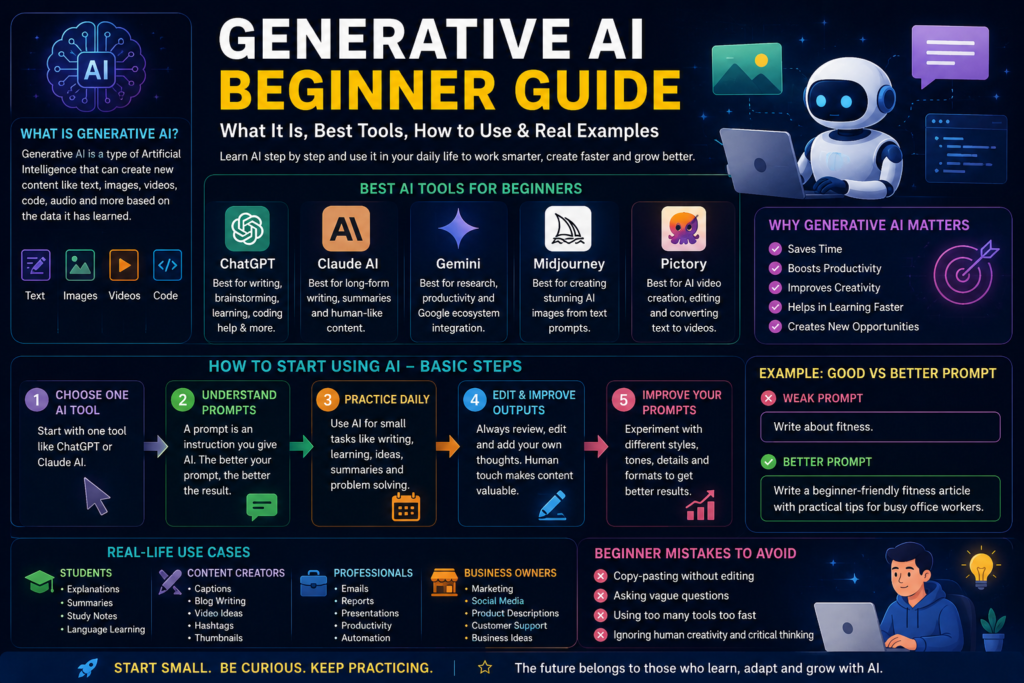
Generative AI is a type of Artificial Intelligence that creates new content based on patterns it has learned from large amounts of data.
That content can include text, images, videos, code, audio, and designs.
Unlike traditional software that follows fixed rules, Generative AI can generate original responses dynamically.
For example, you ask: “Write a motivational Instagram caption.” The AI creates a completely new caption instantly.
That is AI in action.
That is why tools like ChatGPT by OpenAI, Claude by Anthropic, and Google Gemini became so popular so quickly.
To understand how to communicate with these tools effectively, read our complete Prompt Engineering.
Why Generative AI Matters Today
AI is changing how people learn, work, create content, solve problems, and communicate.
Even complete beginners can now write blog posts, generate business ideas, create social media content, build resumes, learn coding basics, and automate repetitive work.
This is why AI skills are becoming important in almost every industry – from healthcare and education to marketing, finance, and technology.
The professionals who learn Generative Artificial Intelligence skills today will have a significant advantage in career growth, productivity, and income over the next five years.
Read our guide on How to Become aHow to Become an How to Become an AI Engineer to see exactly how AI skills can transform your career.
Best Generative AI Tools for Beginners
One of the biggest mistakes beginners make is trying too many tools at once.
Start with a few simple tools first. Here are the best options for beginners right now.
1. ChatGPT by OpenAI
ChatGPT is one of the most popular Generative AI assistants in the world. It is best for content writing, brainstorming ideas, learning new concepts, coding help, and SEO article structure.
Beginner example prompt: “Explain SEO in simple words.”
ChatGPT gives a clear, beginner-friendly explanation instantly.
2. Claude by Anthropic
Claude is known for smoother, more human-like long-form writing. It is best for storytelling, long articles, summarising documents, and natural writing flow.
Beginner example prompt: “Rewrite this paragraph in a more emotional tone.”
Claude improves readability naturally and produces outputs that feel genuinely helpful rather than generic.
3. Google Gemini
Google Gemini is integrated with the Google ecosystem and works seamlessly with Gmail, Google Docs, and Google Drive. It is best for research, productivity, email summarisation, and document assistance.
Beginner example uses include summarising emails, organising information, and generating ideas directly from Google Docs.
4. AI Image Generators
Generative AI can now create stunning images from simple text descriptions. Popular uses include YouTube thumbnails, Instagram posts, logos, and digital art.
Example prompt: “Create a futuristic AI workspace with neon lighting.”
The AI generates original artwork in seconds. Midjourney and Canva AI are the best starting points for image generation.
5. AI Video Tools
AI video platforms help create short videos, subtitles, voiceovers, and social media reels. Tools like Pictory and Descript help beginners create professional video content faster without advanced editing skills.
Generative AI Tools Comparison
Here is a quick comparison of the best Generative AI tools for beginners:
| Tool | Best For | Cost | Link |
|---|---|---|---|
| Claude | Writing, analysis, long form content | Free plan available | claude.ai |
| ChatGPT | General AI tasks, brainstorming | Free plan available | chat.openai.com |
| Google Gemini | Google workspace integration | Free | gemini.google.com |
| Midjourney | AI image generation | $10 per month | midjourney.com |
| Canva AI | Design and visuals | Free plan available | canva.com |
| Pictory | AI video creation | Free trial | pictory.ai |
| Descript | Video and podcast editing | Free plan | descript.com |
How to Start Using Generative AI: Basic Beginner Steps
Many people overcomplicate AI learning.
The truth is that the best way to learn Generative AI is by using it daily with simple, real tasks.
Step 1: Choose One AI Tool First
Do not try ten tools immediately. Start with one platform like ChatGPT or Claude and learn the basics before exploring more.
Step 2: Learn What a Prompt Is
A prompt is simply the instruction you give AI. Think of it like talking to a smart assistant.
Weak prompt: “Write about fitness.”
Better prompt: “Write a beginner-friendly fitness article with practical tips for busy office workers.”
Specific prompts create dramatically better results. To master this skill, read our Prompt Engineering Guide – The Skill That Makes You 10x Faster.
Step 3: Practice Daily With Simple Tasks
Beginners learn faster through small real life tasks.
Try asking AI to:
- Create a study plan
- Explain cloud computing simply
- Write a professional email
- Give Instagram caption ideas
- Summarise an article
This builds confidence quickly.
Step 4: Edit AI Responses Yourself
This is extremely important.
Do not blindly copy AI-generated content. Instead, add your own thoughts, rewrite sentences in your voice, personalise examples, and check accuracy.
The best AI content still feels human.
Step 5: Learn Prompt Improvement
Good AI users are usually good question askers.
Experiment with tone, detail, style, audience, and formatting.
Instead of: “Write a blog.”
Try: “Write an SEO friendly beginner blog with simple language and real examples targeting working professionals.”
The difference in output quality becomes enormous.
Real Life Ways Beginners Use Generative AI Today
Generative AI is no longer just for tech experts. Here are practical beginner use cases across different groups of people.
Students
Students use Generative AI for explanations of complex topics, summarising long reading material, creating study notes, and language learning.
Visit our AI Learning Hub for more beginner resources and step by step guides.
Content Creators
Creators use Generative AI for writing captions, blog writing, generating video ideas, finding hashtags, and creating thumbnails.
AI dramatically speeds up the content creation process so creators can post more consistently and grow faster.
Software Professionals
Tech professionals use AI for debugging code, automating repetitive tasks, writing documentation, and learning new tools faster.
If you work in tech and want to use AI to advance your career, read our guide on Free AI Courses with Certificate in 2026.
Small Business Owners
Businesses use AI for marketing copy, customer communication, product descriptions, and social media planning.
Discover how businesses are using AI agents to automate their operations in our guide on 10 AI Agent Tools Must Try in 2026 – Stop Wasting Time Without Them.
How to Make Money With Generative AI
Generative AI is not just a productivity tool. It is a genuine income opportunity for anyone willing to learn the right skills.
People are currently earning real income by:
- Offering AI content writing services
- Creating and selling Artificial Intelligence-generated images
- Building AI chatbots for businesses
- Offering prompt engineering as a freelance service
- Using AI to dramatically increase productivity in their current job
Beginner Mistakes to Avoid With Generative AI
Learning Generative Artificial Intelligence becomes much easier when you avoid these common beginner mistakes.
1. Copy-Pasting Without Editing
AI should support your creativity, not replace your thinking. Always review and improve AI outputs before using them. Add your own voice, your own experience, and your own examples.
2. Expecting Perfect Results Immediately
Generative Artificial Intelligence improves with better instructions. Your first prompts may not be perfect, and that is completely normal. Each attempt teaches you something new about how to communicate with AI more effectively.
3. Using Too Many Tools Too Fast
Beginners often feel overwhelmed trying every new AI tool that appears. Master the basics of one tool first. Once you are comfortable, exploring others becomes much easier and more enjoyable.
4. Ignoring Human Creativity
Generative AI can generate information quickly. But human emotion, personal experience, and authentic storytelling still matter deeply. That is what makes content memorable, trustworthy, and genuinely valuable to readers.
The Future of Generative AI Learning
Generative AI is evolving rapidly.
But one thing is becoming clear. People who learn how to work with AI effectively will have significant advantages in productivity, learning speed, content creation, and career growth.
You do not need to become an AI engineer overnight. You simply need to become comfortable using Generative AI intelligently and consistently.
That alone creates enormous opportunities.
If you want to take your AI skills to the next level, explore the free courses available at Anthropic Academy and read our complete Blogs for step-by-step guidance.
Final Thoughts
Generative AI may feel intimidating in the beginning. But once you start using it step by step, it becomes surprisingly approachable.
Start small. Be curious. Experiment without fear.
Because learning Generative AI today is not about becoming perfect immediately. It is about becoming adaptable, capable, and ready for the future that is already here.
And honestly, that journey is just getting started.
Follow AI Pathway Lab for more practical guides at aipathwaylab.com.
Frequently Asked Questions
What is Generative AI in simple words?
Generative AI is a type of artificial intelligence that creates new content from scratch based on your instructions. Unlike traditional software that follows fixed rules, Generative AI learns from massive amounts of data and uses that learning to generate text, images, code, audio, and video that feels natural and human-like. When you type a question into Claude or ChatGPT and get a detailed answer back, that is in action.
Is Generative AI tools free to use?
Yes, most popular AI tools offer free plans that are genuinely useful for beginners. Claude, ChatGPT, and Google Gemini all have free versions you can start using today without a credit card. Paid plans unlock higher usage limits and more advanced features, but the free versions are more than enough to get started and see real results.
Do I need coding or technical skills to use Generative AI?
Absolutely not. Generative AI tools are designed for everyone, not just developers. If you can type a sentence, you can use Generative AI. The skill that matters most is knowing how to describe what you want clearly and specifically. Read our complete Prompt Engineering Guide – The Skill That Makes You 10x Faster to get started.
What is the best Generative AI tool for a complete beginner?
For most beginners, the best starting point is Claude by Anthropic. It is free to use, exceptionally good at understanding natural language, and produces outputs that feel genuinely helpful. For image generation, Canva AI is the easiest starting point because it combines AI image creation with a familiar drag-and-drop design interface.
What is the difference between Generative AI and regular AI?
Regular AI is designed to recognise patterns and make predictions based on existing data. Generative AI goes a step further and creates entirely new content. A regular AI might tell you whether an image contains a cat. A Generative AI can create a completely new image of a cat based on your description. That is what makes tools like Claude, ChatGPT, and Midjourney so powerful and exciting.
How long does it take to learn Generative AI as a beginner?
You can start getting genuinely useful results from Generative AI tools within your first hour of use. Basic proficiency typically comes within one to two weeks of regular use. To reach a professional level most people achieve this within one to three months of consistent learning and practice. The free courses at Anthropic Academy are the best place to start your structured learning journey.
Can Generative AI replace my job?
Generative AI is more likely to change your job than replace it entirely. Professionals who learn to use Generative AI effectively will be significantly more productive and better paid than those who do not. The risk is not AI replacing you; it is someone who uses AI outperforming you. Read our guide on How to Become an AI Engineer to see how AI skills can grow your career.
What can Generative AI actually help me with day to day?
Generative AI can write and edit your emails, summarise long documents in seconds, generate social media content, create images for your business, write and debug code, translate languages, plan your week, research any topic, help you prepare for job interviews, and answer almost any question you have. Once you start using it regularly, you will wonder how you managed
Is Generative AI safe and reliable to use?
Generative AI tools from reputable companies like Anthropic, OpenAI, and Google are safe to use for everyday tasks. Never share sensitive personal information like passwords or bank details with any AI tool. Always verify important facts that AI generates because AI can occasionally produce inaccurate information. Use AI as a powerful assistant that enhances your work rather than a replacement for your own judgment and fact-checking.
How can I make money using Generative AI skills?
There are many realistic ways to earn money with Generative AI skills. You can offer AI content writing services on Fiverr or Upwork, create and sell AI-generated art through Redbubble or Etsy, build AI automation systems for businesses, offer prompt engineering as a freelance service, or use AI tools to increase your productivity and position yourself for a higher salary.
Written by AI Pathway Lab — practical guides for building real skills and real income with AI.
Explore more at aipathwaylab.com