Table of Contents
Model Context Protocol is changing the way AI systems connect to the world around them.
Think about the USB-C port on your laptop.
Before USB-C existed, every device used a different connector. Your phone used one cable. Your monitor used another. Your hard drive used yet another. Every new device you bought meant hunting for yet another proprietary cable that only worked with that specific device.
USB-C changed everything by creating one universal standard. One port. One cable type. Plug anything in, and it just works.
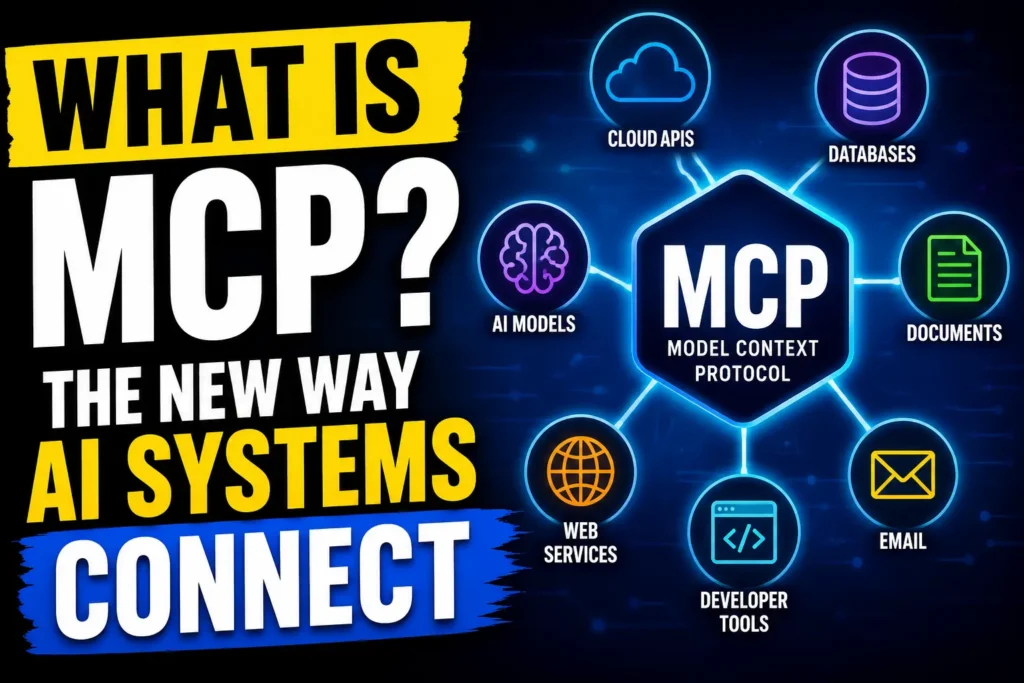
Model Context Protocol is the USB-C port for artificial intelligence.
Before this standard existed, every AI system that wanted to connect to an external tool, database, or service needed a custom integration built specifically for that combination. Claude connecting to Google Drive required one bespoke solution. Connecting to a database required a completely different one. Each integration was its own engineering project.
It changes this by creating a universal open standard that allows any AI system to connect to any external tool or data source using the same protocol. Build once, connect everywhere.
This guide explains what it is, why Anthropic created it, how it works in plain English, and what it means for the future of AI systems like Claude.
What Is Model Context Protocol?
Model Context Protocol (MCP) is an open standard developed by Anthropic that defines how AI systems communicate with external tools, data sources, and services. It was released in November 2024 and has quickly become one of the most important developments in practical AI infrastructure.
The name breaks down simply. “Model” refers to the AI model, like Claude. “Context” refers to the information and tools the model needs to do its job. “Protocol” refers to the standardised rules that govern how that communication happens.
Together, these three words describe the rulebook that tells AI systems and external services how to talk to each other in a way that is consistent, secure, and reusable across any combination of tools.
Before this standard existed, connecting an AI to an external service meant custom code for every single integration. A developer who wanted Claude to read files, search the web, check a calendar, and query a database had to build four separate, incompatible integration systems. With MCP, they build one integration following the standard protocol, and it works across all supported tools and AI systems.
To understand why this matters so much, it helps to first understand what AI models need to do their jobs well. Our large language model guide explains the foundational technology that MCP is designed to enhance.
Why Model Context Protocol Was Created
The problem MCP solves is called the context limitation problem, and it is one of the most fundamental constraints in practical AI systems.
A large language model like Claude is incredibly capable within the boundary of what it knows from training and what you include in a conversation. But the moment you need it to access your actual files, your real database, your live calendar, or your specific company knowledge, it hits a wall.
Before MCP existed, bridging that wall required custom integrations that were expensive to build, difficult to maintain, and impossible to reuse across different AI systems or tools. A company that built a custom Claude-to-Salesforce integration could not share that work with anyone else. Another company building the same integration had to start from scratch.
This created a fragmented ecosystem where every AI application was its own isolated island of custom code, and the same integration work was being duplicated thousands of times by thousands of different development teams worldwide.
Anthropic created MCP to solve this fragmentation. By publishing an open standard any developer or company could adopt, they made it possible for the entire AI ecosystem to share integration work rather than duplicate it.
The result is a growing library of pre-built MCP servers that connect AI systems to popular tools like Google Drive, Slack, GitHub, databases, and hundreds more, all following the same MCP standard so they work with any compatible AI system without custom code.
How Model Context Protocol Works: The Simple Version
Understanding MCP does not require a computer science degree. The architecture has three components, and they map onto a simple real-world analogy.
Imagine a restaurant. There is a customer who wants food, a waiter who takes orders and carries information between the kitchen and the customer, and a kitchen that prepares the food.
In this system:
The customer is the MCP Host. This is the AI application the user is actually interacting with, like Claude Desktop or an AI-powered coding tool. The host is where the user sits and makes requests.
The waiter is the MCP Client. This is the component inside the host application that speaks the Model Context Protocol language. It takes the user’s request, translates it into the standard protocol format, and sends it to the right place.
The kitchen is the MCP Server. This is where the actual external tool or data source lives. An MCP server might connect to your file system, your Google Drive, your database, or your company’s internal knowledge base. It receives requests in MCP format, retrieves or processes the relevant information, and sends it back to the client.
When you ask Claude to “summarise the document in my Google Drive called Q3 Report,” here is what MCP makes possible:
The MCP host receives your request. The client translates it into MCP format and sends it to the Google Drive MCP server. The server authenticates, retrieves the document, and returns its contents to the client. The client passes that content to Claude as context through Model Context Protocol. Claude reads the document and produces your summary.
All of this happens in seconds through a standardised MCP communication layer that works the same way regardless of which AI model or external service is involved.
Explore Claude Tutorial for Beginners: Master AI in 20 Minutes (Step-by-Step Guide)v
Real Life Example 1: Claude Connecting to Google Drive
Imagine Rachel, a marketing manager at a mid-sized company in Boston, Massachusetts. Her team produces dozens of reports, briefs, and campaign plans every month, all stored in Google Drive.
Before MCP, asking Claude to help with these documents meant manually opening each file, copying the text, pasting it into Claude, and then manually implementing whatever Claude suggested back in the original document. For a team producing dozens of documents per week, this was a significant time drain.
With a Google Drive MCP server connected to Claude Desktop, Rachel’s workflow transforms completely.
She opens Claude Desktop and says: “Read my latest campaign brief from Google Drive and suggest three improvements to the executive summary.”
Claude accesses Google Drive through the MCP connection directly, finds the most recent campaign brief, reads it, and returns three specific, contextually accurate improvement suggestions, referencing actual content from the document.
Rachel reviews the suggestions, asks Claude to implement two of them, and the revised document is saved back to Google Drive.
She never left Claude Desktop. She never copied and pasted anything manually. The MCP layer handled all the communication between Claude and Google Drive automatically.
This is what MCP enables in everyday professional workflows.
Real Life Example 2: An AI Agent Connecting to a Database
Now imagine a software development team at a startup in San Francisco, California. They use Claude as their AI coding assistant and want it to help debug issues in their production database without their developers having to manually query the database and paste results into Claude every time.
They set up a Model Context Protocol database server that connects Claude to their PostgreSQL database.
Now when a developer asks Claude “why are users in the eastern timezone experiencing checkout failures since yesterday afternoon,” Claude can:
Query the database directly through the MCP connection to retrieve the relevant error logs and transaction records. Analyse the actual data rather than hypothetical scenarios. Identify the specific database query that is failing and the exact conditions that trigger it. Suggest a precise fix based on real production data.
The developer gets a specific, data-grounded answer in minutes instead of spending an hour manually querying logs and sharing them with Claude piece by piece.
This is MCP enabling AI agents to do genuinely useful work with real systems rather than operating in an isolated context bubble. Our AI agents guide covers how AI agents use external connections like this to complete real-world tasks autonomously.
Model Context Protocol vs Traditional API Integration
If you are familiar with APIs, you might wonder how MCP is different from a standard API integration. The distinction is important.
Traditional API integration is a custom, point-to-point connection built specifically for one AI system talking to one external service. It requires custom code for every combination, cannot be reused across different AI systems, and must be rebuilt or adapted every time either the AI system or the external service changes.
Model Context Protocol is a universal standard that sits above individual APIs. An MCP server for Slack handles all the Slack-specific API communication internally. Any AI system that supports MCP can connect to that Slack server without knowing anything about Slack’s specific API. The MCP layer abstracts away the differences between individual services and presents a consistent interface to any compatible AI system.
Think of it this way. A traditional API integration is like building a custom road between two specific cities. MCP is like building a highway network with standardised on-ramps that any vehicle can use to reach any city on the network.
Explore Claude API Tutorial for Complete Beginners: Best Hands-On Guide
Who Is Using Model Context Protocol Today
Since Anthropic published the Model Context Protocol open-source specification in November 2024, adoption has grown rapidly across the AI ecosystem.
Anthropic uses Model Context Protocol natively in Claude Desktop, making Claude Desktop the most MCP-ready AI assistant available to consumers and developers today.
Block, Apollo, and Replit were among the earliest enterprise adopters, integrating MCP into their development and business tools.
Developer community has contributed hundreds of open-source MCP servers covering tools like GitHub, Google Drive, Slack, PostgreSQL, Filesystem access, Brave Search, and many more. These are freely available for anyone to use with any MCP-compatible AI system.
AI development frameworks including several major platforms have announced MCP support, meaning applications built on these frameworks automatically gain compatibility with the growing library of MCP servers.
The momentum behind MCP suggests it is becoming the de facto standard for AI-to-tool communication across the industry, similar to how HTTP became the standard for web communication.
Key Benefits of Model Context Protocol
The advantages of MCP extend to every participant in the AI ecosystem:
For developers: Build one MCP server for your tool and it works with every compatible AI system. No more building custom integrations for Claude, then rebuilding for ChatGPT, then rebuilding again for the next AI system your users adopt.
For businesses: Deploy AI systems that connect to your actual data and tools without commissioning expensive bespoke integration work for every combination you need.
For AI users: Experience AI assistants that genuinely know your context, your files, and your tools rather than operating in an isolated bubble of training data and conversation history.
For the AI ecosystem: A shared standard accelerates innovation by allowing the community to build on each other’s work rather than duplicating effort across thousands of isolated projects.
For security: Model Context Protocol includes standardised security and permission controls, so AI systems only access what they are explicitly authorised to access, with clear audit trails.
How to Get Started With MCP
You do not need to be a developer to benefit from Model Context Protocol today. Here are three practical entry points:
As a Claude user: Download Claude Desktop from anthropic.com. Claude Desktop supports MCP natively. You can connect pre-built MCP servers for popular tools following the official MCP documentation.
As a developer: Visit the official Model Context Protocol website and read the quickstart guide. The specification is open source and the community has published extensive resources for building your first MCP server. The Model Context Protocol GitHub repository contains example servers you can learn from and adapt.
As a business user: Check whether the tools your team already uses have published MCP servers. GitHub, Google Drive, Slack, and many other popular business tools already have community-built MCP servers available. Connecting these to Claude Desktop can transform how your team uses AI within weeks.
To understand how MCP fits into the broader landscape of agentic AI systems, our agentic AI guide and multi-agent system guide provide the context that makes the role of MCP in the AI stack clear. And for practical guidance on prompting Claude effectively once it is connected to your tools via MCP, our prompt engineering guide covers everything you need.
For official technical details, the Anthropic MCP announcement is the authoritative source.
What the Future Holds for Model Context Protocol
The trajectory of MCP points toward a world where AI systems are no longer isolated tools that require constant manual context feeding, but genuinely connected assistants that know your tools, your data, and your workflows as naturally as a human colleague does.
Several developments on the horizon will accelerate this:
Universal adoption across AI systems. As more AI providers adopt MCP, the ecosystem of compatible servers grows more valuable for everyone. A developer who builds a Model Context Protocol server today is building something that works with every compatible AI system, past, present, and future.
Remote MCP servers. Currently, many MCP implementations run locally. Remote MCP servers will allow AI systems to connect to cloud-hosted tools and services with the same simplicity, opening MCP to web-based AI applications at scale.
Enterprise Model Context Protocol infrastructure. Large organisations will build internal MCP ecosystems connecting their AI systems to proprietary databases, knowledge bases, and business tools in ways that are secure, auditable, and reusable across teams.
MCP as the default AI integration standard. Just as HTTP became the default standard for web communication without most web users knowing what HTTP means, MCP is on a trajectory to become the invisible but essential infrastructure layer that makes connected AI feel natural and effortless.
Understanding MCP now puts you ahead of the vast majority of AI users and professionals who will encounter it as a fait accompli in the tools they use, without ever understanding the standard that makes it work.
Explore more articles from AI blogs AI Learning Hub subscribe to AI Pathway Lab explore AI Tools & News
Read Top 100 AI Words You Need to Know: Complete AI Glossary
Explore Claude tutorials: Claude Artifacts: What They Are and How to Use Them
Claude AI to Earn Money Guide: 4 Proven Ways That Actually Work
Build an AI Automation Agency Using Claude AI: Beginner to Pro Guide
Anthropic Free AI Certificates: All 13 Courses Explained in Under 20 Minutes
Frequently Asked Questions
What is Model Context Protocol in simple terms?
Model Context Protocol is an open standard created by Anthropic that allows AI systems like Claude to connect to external tools, databases, and services in a standardised way. Instead of building a custom integration for every AI-to-tool combination, Model Context Protocol provides a universal communication layer that works across any compatible AI system and any supported external service.
Who created Model Context Protocol?
Model Context Protocol was created and released by Anthropic, the AI safety company behind Claude, in November 2024. Anthropic published it as an open-source standard, meaning any developer, company, or AI system can adopt and build on Model Context Protocol without licensing fees or restrictions.
How is Model Context Protocol different from an API?
A traditional API is a custom connection built for one specific pair of systems. Model Context Protocol is a universal standard that sits above individual APIs, allowing any compatible AI system to connect to any MCP server without knowing the specifics of the underlying service’s API. It is the difference between building a custom road and building a standardised highway network.
What can Claude do with Model Context Protocol?
With Model Context Protocol, Claude can read and write files on your computer, access Google Drive documents, search GitHub repositories, query databases, check calendars, send messages through connected services
Is Model Context Protocol only for Claude?
No. While Anthropic created Model Context Protocol and Claude has the most mature MCP support, the standard is open and designed for any AI system to adopt. Other AI providers and platforms have begun supporting Model Context Protocol, meaning the ecosystem of MCP servers benefits any compatible AI system, not just Claude.
Do I need coding skills to use Model Context Protocol?
Not necessarily. Claude Desktop users can connect pre-built MCP servers through configuration files without writing code. For building custom MCP servers or advanced integrations, basic programming knowledge is helpful. The official Model Context Protocol documentation provides beginner-friendly guides for both use cases.
Where can I find MCP servers to use with Claude?
The official Model Context Protocol GitHub repository contains a curated list of servers built by Anthropic and the community. Popular MCP servers already available include connections to Google Drive, Slack, GitHub, PostgreSQL databases, local file systems, Brave Search, and many more. The list grows regularly as developers contribute new servers.
What is the future of Model Context Protocol?
Model Context Protocol is on track to become the universal standard for AI-to-tool communication, similar to how HTTP became the standard for web communication. Future developments include remote MCP servers for cloud-based tools, enterprise MCP infrastructure for large organisations, and adoption by more AI providers, creating a shared ecosystem where any MCP server works with any compatible AI system.
Explore more articles from AI Pathway Lab Blogs AI Basics