Table of Contents
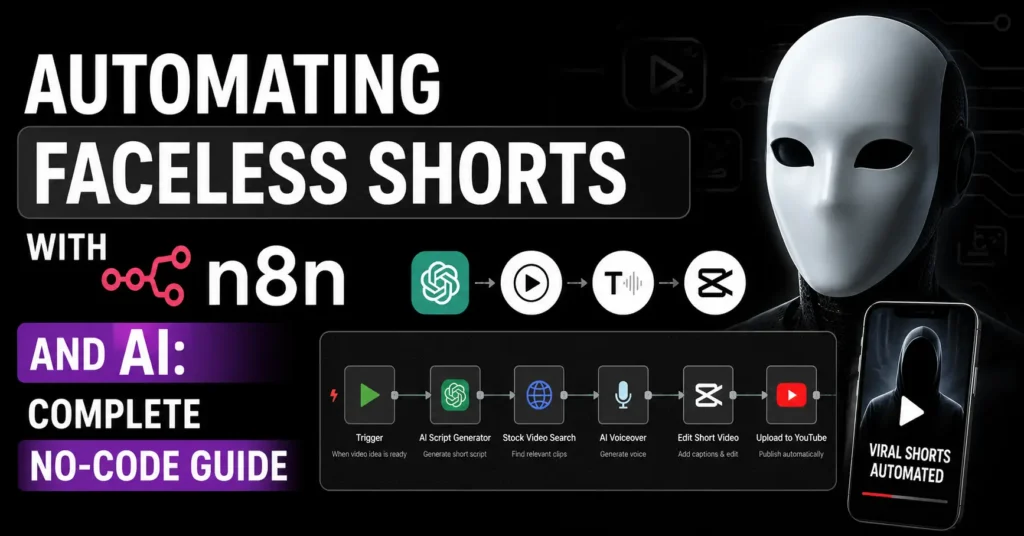
Automating faceless shorts with n8n is one of the most powerful content systems any creator can build right now.
Imagine selecting a video category, choosing a duration, clicking submit, and receiving a completely finished video in your email inbox. Script written. Voiceover generated. Visuals created. Video assembled. All automatically. All without touching a camera, recording your voice, or spending hours in a video editor.
That is exactly what automating faceless shorts with n8n makes possible.
A single automation workflow handles every step. Topic generation, research, script writing, visual creation, video assembly, and delivery all happen automatically while you focus on other things. You can run this system for YouTube Shorts, TikTok, or Instagram Reels in any niche you choose.
This guide walks you through the complete setup from zero to a fully working automating faceless shorts with n8n system using free and low-cost tools. No coding required. No design skills needed. Just follow each step in order and your video automation system will be ready.
Read our complete guide on How to Make Money with Faceless YouTube Automation Using AI to understand the full income potential before building your automating faceless shorts with n8n system.
What Is Automating Faceless Shorts With n8n?
Automating faceless shorts with n8n means using n8n as the central automation engine that connects multiple AI services together into one seamless video creation workflow.
n8n is an open source automation platform that lets you connect different apps and services through a visual drag-and-drop interface. Think of it as the central hub that coordinates every tool in your workflow. It tells OpenAI to generate topic ideas. It sends those ideas to Tavily AI for research. It passes that research to Claude to write a script. It sends the script to JSON2Video to create the video. And finally, it emails the finished video directly to you.
Automating faceless shorts with n8n does not require you to write code. The connections between services are built visually by adding nodes and linking them together. Each node represents one step in your workflow.
The result is a system that creates complete, faceless videos automatically whenever you want one. Pick a category, choose a duration, submit the form, and your finished video arrives by email.
Why n8n Is Perfect for Automating Faceless Shorts
Automating faceless shorts with n8n specifically makes sense for three clear reasons.
First, n8n is open source. When you host n8n yourself through a service like WebspaceKit, you get unlimited active workflows and unlimited workflow executions at a fraction of the cost of other automation platforms. Other services charge per task or per workflow run, which makes high-volume video creation expensive fast.
Second, n8n connects to almost everything. The tools needed for automating faceless shorts with n8n — OpenAI, Claude API, Tavily AI, JSON2Video, and Gmail — all have pre-built n8n integrations. Connecting them requires only an API key and a few clicks.
Third, n8n has a ready-made template for faceless video creation. Instead of building every node manually you import a pre-built workflow template and connect your accounts. This reduces setup time from hours to minutes.
Tools You Need for Automating Faceless Shorts With n8n
Before setting up automating faceless shorts with n8n gather these tools and accounts:
| Tool | Purpose | Cost |
|---|---|---|
| n8n via WebspaceKit | Automation platform hosting | $14 per month |
| OpenAI API | Topic idea generation | Pay per use |
| Tavily AI | Web research for scripts | Free plan available |
| Claude API by Anthropic | Script writing | Pay per use |
| JSON2Video | Automated video creation | Free plan available |
| Gmail | Video delivery to your inbox | Free |
All API costs for automating faceless shorts with n8n are minimal. Generating one video typically costs under $0.10 in API usage across OpenAI and Claude combined.
Part 1: Get Access to the n8n Automation Platform
The first part of automating faceless shorts with n8n is setting up n8n itself. There are three ways to run n8n.
Option 1: Host n8n locally on your computer
This is free but requires technical setup and means your automation only runs when your computer is on. Not recommended for production use.
Option 2: WebspaceKit hosting (Recommended)
This is the best option for automating faceless shorts with n8n beginners. WebspaceKit hosts n8n on a cloud server for $14 per month. You get unlimited active workflows, unlimited executions, and your automation runs around the clock even when your computer is off.
Option 3: n8n Cloud
The official n8n platform costs approximately $27 per month with more limited features compared to self-hosting on WebspaceKit.
Step 1: Set Up n8n on WebspaceKit
Go to WebspaceKit and select the n8n hosting plan. Choose 12 months for the best price of $14 per month. Fill in your details, complete payment, and your n8n hosting activates immediately.
Once payment is confirmed, click Go to Setup. Fill in your n8n configuration details and click Next. Your n8n dashboard opens and you are ready to build your automating faceless shorts with n8n workflow.
Step 2: Import the Workflow Template
Instead of building your automating faceless shorts with n8n workflow from scratch use the ready-made template available in WebspaceKit.
In your WebspaceKit dashboard scroll down to find the workflow templates section. Select the Faceless Video AI Agent template and click Download. The template file saves to your computer.
Go back to your n8n dashboard. Click Start From Scratch. Click the menu icon and select Import From File. Upload the template file you just downloaded.
Your complete automating faceless shorts with n8n workflow appears with all nodes already connected. Rename the workflow to something clear like Faceless Video Automation and save it.
Part 2: Connect the Services to Your Workflow
The second part of automating faceless shorts with n8n is connecting each AI service to your workflow. Each connection requires signing up for the service and adding an API key to the relevant node.
Step 1: Connect OpenAI to Your Workflow
OpenAI generates the video topic ideas in your automating faceless shorts with n8n system. When you select a category and click submit, OpenAI creates ten different topic ideas for you to choose from.
Go to platform.openai.com and sign in with your Google account. Click API Keys in the left menu. Click Create New Secret Key. Give it a name like n8n Faceless Videos. Click Create Secret Key and immediately copy the key that appears. You cannot view it again after closing this window.
Go back to your n8n workflow. Find the OpenAI node — it will have a red warning indicator showing it needs setup. Double-click it. Click the credentials field and select Create New Credentials. Paste your OpenAI API key. Click Save.
Once you connect OpenAI to the first node all other OpenAI nodes in your automating faceless shorts with n8n workflow automatically inherit the same credentials. Open each OpenAI node individually and confirm the credentials are applied. The red warning indicators disappear when correctly connected.
Important: OpenAI requires a funded account separate from your ChatGPT subscription. Go to the Billing tab in your OpenAI account and add a minimum balance. For automating faceless shorts with n8n video creation $10 covers hundreds of videos.
Step 2: Connect Tavily AI to Your Workflow
Tavily AI searches the web for current, relevant information about your chosen video topic. This research becomes the foundation of your script in the automating faceless shorts with n8n workflow.
Go to tavily.com and sign in with your Google account. Your API key appears on your dashboard. Copy it.
In your n8n workflow, find the Tavily AI node. Double-click it. Paste your Tavily API key in the credentials field. Click Save. Your automating faceless shorts with n8n workflow now has access to real-time web research.
Step 3: Connect Claude API to Your Workflow
Claude by Anthropic takes the topic idea and the Tavily research and writes a complete video script scene by scene. Claude produces the most natural, engaging scripts in the automating faceless shorts with n8n workflow because of its exceptional writing quality.
Go to anthropic.com and sign in. Click API Keys in your account dashboard. Click Create API Key. Select your workspace and give the key a name like n8n Video Workflow. Click Add and copy the key immediately.
Go back to your n8n workflow. Find the Anthropic Claude node. Double click it. Click the credentials field and select Create New Credentials. Paste your Claude API key. Click Save.
Your automating faceless shorts with n8n workflow now has Claude writing professional scripts from research automatically. Read our Claude AI Earn Money Guide to understand the full range of what Claude API can do beyond this workflow.
Part 3: Set Up Video Generation
The third part of automating faceless shorts with n8n is connecting JSON2Video which converts your Claude-written script into a finished video with visuals, voiceover, and music.
Step 1: Create Your JSON2Video Account
Go to json2video.com and click Get API Key. Sign in with your Google account. JSON2Video sends your API key to your email address. Check your inbox, copy the API key, return to JSON2Video, paste it in the confirmation field, and click Sign In.
Step 2: Create Your Movie Template
The movie template defines the visual structure of every video that your automating faceless shorts with n8n system creates. It determines how many scenes appear, where text overlays sit, what image style is used, how the voiceover is applied, and how the scenes transition.
In JSON2Video click Movie Templates. Click Add New Template. Click the edit icon and give your template a name like Faceless Shorts Template.
Click Edit Template JSON. This is where you paste your template code. JSON2Video provides ready-made template files for common video formats. Download the faceless shorts template from JSON2Video’s template library. Open the file, copy all the code, paste it into the JSON editor, and click Update JSON.
A preview of your video layout appears, showing exactly how your finished videos will look. This same layout applies to every video you’re automating faceless shorts with n8n system creates, giving your channel a consistent visual identity.
Step 3: Add Your Template ID to the Workflow
Your n8n workflow needs to know which template to use for video generation. To connect them click on your template in JSON2Video and select Show Template ID. Copy the ID that appears.
Go back to your n8n workflow. Find the video generation node. Double-click it. Paste your Template ID in the designated field. Click Go Back to Canvas.
Step 4: Add Your JSON2Video API Key to the Workflow
In your n8n workflow find the JSON2Video API node. Double click it. Click the credentials field and select Create New Credentials. Enter the field name as X-API-Key. Paste your JSON2Video API key. Click Save.
Click Go Back to Canvas. Open the JSON2Video node and confirm the API credentials are connected. Your automating faceless shorts with n8n video generation system is now fully configured.
Connect Gmail for Video Delivery
The final connection in your automating faceless shorts with n8n system is Gmail. This node sends the finished video URL to your email when generation is complete.
In your n8n workflow find the Gmail node. Double click it. Click the credentials field and select Create New Credentials. Click Sign In With Google. Select your Gmail account. Grant the requested permissions and click Continue.
Your email account is now connected. Every finished video from your automating faceless shorts with n8n system is delivered directly to your inbox as a link.
Save your entire workflow by clicking the Save button. Your automating faceless shorts with n8n system is complete and ready to test.
How to Run Your Automating Faceless Shorts With n8n Workflow
Testing your automating faceless shorts with n8n workflow is straightforward.
Click Test Workflow to activate it. A form appears asking for your video preferences.
Select your category. Choose from options like science, history, psychology, technology, personal finance, or health. If your niche is not listed, type it manually.
Choose your video duration. For YouTube Shorts and TikTok, select 60 seconds or under. For longer YouTube content, choose 5 to 15 minutes.
Choose your video style. Options typically include educational, storytelling, documentary, and motivational styles.
Choose your voice model. Different voices suit different content styles. Educational content works well with clear, confident voices. Storytelling content performs better with warmer narrative voices.
Enter your email address. This is where your finished video delivers.
Click Submit. Your automating faceless shorts with n8n workflow activates immediately.
A window appears showing ten video topic ideas generated by OpenAI. Review them and select the one that best suits your channel. If none appeal, click Regenerate for a fresh batch of ideas. Once you select a topic, click Submit.
Your automating faceless shorts with n8n system now works automatically. Tavily AI researches the topic. Claude writes the script. JSON2Video creates the visuals, voiceover, and assembles the video. Gmail delivers the finished video URL to your inbox.
Check your email. The video is ready to download and publish.
How to Earn Money From Your Automating Faceless Shorts With n8n System
Automating faceless shorts with n8n creates the infrastructure for multiple income streams.
YouTube Shorts monetisation:
YouTube Shorts creators earn through the YouTube Partner Programme once they reach 500 subscribers and 3,000 watch hours or 3 million Shorts views in 90 days. With automating faceless shorts with n8n, producing consistent daily content reaching these thresholds is significantly faster than manual creation.
TikTok Creator Fund:
TikTok pays creators through its Creator Fund for videos over 1 minute. Automating faceless shorts with n8n can produce TikTok-ready content in the same workflow by adjusting the duration setting.
Affiliate marketing:
Include affiliate links in video descriptions from day one. Your automating faceless shorts with n8n content on topics like personal finance, technology, and productivity naturally integrates affiliate promotions for relevant products and services.
Selling the workflow:
Once you have built and mastered your automating faceless shorts with n8n system other creators will pay for help setting up the same system. Offer setup services on Fiverr or Upwork charging $200 to $600 per client.
Read our complete pillar guide on 12 Real Ways to Make Money With AI for the full income landscape that automating faceless shorts with n8n fits into.
Also, explore our guide on How to Earn Money While You Sleep Using AI Agents to see how automating faceless shorts with n8n connects to the broader passive income ecosystem.
Common Mistakes When Automating Faceless Shorts With n8n
Do not fund your OpenAI account separately.
Your ChatGPT subscription does not cover API usage. Automating faceless shorts with n8n requires a funded OpenAI API account. Add $10 to your API billing balance before testing.
Closing the browser during testing.
When running your first workflow test keep the browser open until the process completes. Closing it can interrupt the automating faceless shorts with n8n generation process.
Skipping the template step.
The movie template in JSON2Video defines every video’s structure. Skipping or rushing this step produces inconsistent results. Take time to set up a template that reflects the visual style you want for your channel.
Not saving after each connection.
Save your n8n workflow after connecting each service. If something goes wrong you do not lose your previous setup work.
Choosing a niche that is too broad.
Automating faceless shorts with n8n performs best when your channel has a clear, specific niche. Broad topics produce generic content. Specific niches like beginner investing tips for Americans in their 30s or daily psychology facts outperform general content consistently.
Frequently Asked Questions About Automating Faceless Shorts With n8n
Do I need coding skills for automating faceless shorts with n8n?
No coding is required. Automating faceless shorts with n8n uses a visual workflow builder where you connect nodes by clicking and dragging. The only technical steps are copying and pasting API keys from each service into the relevant n8n node. If you can copy and paste text you can build this workflow.
How much does automating faceless shorts with n8n cost per month?
The primary cost of automating faceless shorts with n8n is WebspaceKit hosting at $14 per month. API costs for OpenAI and Claude are approximately $0.05 to $0.15 per video depending on length. Creating 30 videos per month costs roughly $14 to $20 total. JSON2Video and Tavily AI have free plans that cover beginner usage.
How long does it take to generate one video?
Once your automating faceless shorts with n8n workflow is running a complete video typically takes 3 to 8 minutes to generate depending on video length and server load. You submit the form and the finished video arrives in your email while you do other things.
Can I use this system for TikTok and Instagram as well as YouTube?
Yes. Automating faceless shorts with n8n produces videos in any format your JSON2Video template is configured for. Create separate templates for 9:16 vertical format for TikTok and Instagram Reels and 16:9 landscape for YouTube. Switch between templates in your workflow settings depending on which platform you are creating for.
What niches work best for automating faceless shorts with n8n?
The highest performing niches for automating faceless shorts with n8n channels targeting US audiences are science and space, psychology and human behaviour, personal finance and investing, AI and technology, history and true crime sub-niches, and health and longevity. Choose a niche with high US search interest and monetisation potential. Read our Prompt Engineering Guide to learn how to write better prompts for niche-specific content generation.
Conclusion
Automating faceless shorts with n8n gives you a complete, repeatable video creation system that runs automatically every time you want content.
The workflow is clear. n8n connects everything. OpenAI generates your ideas. Tavily researches your topic. Claude writes a compelling script. JSON2Video creates the finished video. Gmail delivers it to your inbox. You publish and build your channel.
The income potential from automating faceless shorts with n8n grows with every video you publish. Ad revenue, affiliate commissions, workflow setup services, and digital products all become accessible as your channel grows.
The setup takes a few hours. Once running your automating faceless shorts with n8n system creates videos indefinitely with minimal ongoing effort.
Start with WebspaceKit today. Build your workflow this weekend. Publish your first automated video next week.
Explore more at Blogs:
- How to Make Money with Faceless YouTube Automation
- 12 Real Ways to Make Money With AI
- How AI Agents Work
- How to Build a No-Code AI Agent
- Claude AI Earn Money Guide
- Earn Money While You Sleep Using AI Agents