Artificial Intelligence is completely transforming AI QA workflows in 2026. Traditional testing methods require significant manual effort, time, and resources — but those days are changing fast.
Today, AI-powered tools are helping QA engineers automate repetitive tasks, analyze test data faster, and predict defects before they ever impact real users. Whether you are a Manual QA engineer or an Automation specialist, understanding how AI accelerates QA workflows is now essential for your career growth.
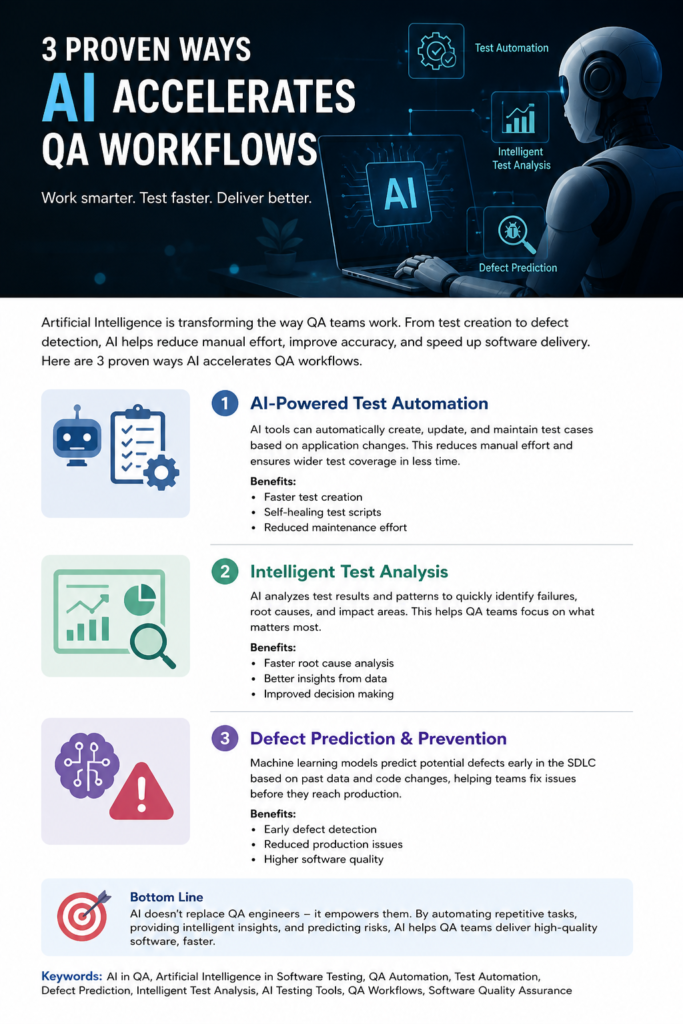
In this guide, we explore the 3 proven ways AI accelerates QA workflows and helps software teams deliver higher-quality products in less time. If you are looking to future-proof your QA career, this is the article you need to read today.
💡 Want to transition from Manual QA to AI QA Engineer? Read our complete guide: AI Tester Workflow That Makes You 10x Faster – Stop Manual
1. AI-Powered Test Automation
The first and most impactful way AI accelerates QA workflows is through intelligent test automation. Traditional test automation requires QA engineers to manually write, update, and maintain test scripts every time the application changes. This is time-consuming, expensive, and prone to human error.
AI-driven automation tools solve this problem completely. These tools can create, update, and maintain test cases automatically — adapting to application changes without any manual intervention from the QA team.
How AI-Powered Test Automation Works
Instead of writing scripts manually every time the UI changes, AI tools handle everything automatically:
- 🔍 Detect UI changes — AI monitors your application and identifies when elements have moved or changed
- 🔄 Update test scripts automatically — self-healing scripts adapt to changes without breaking
- 📉 Reduce maintenance effort — QA engineers spend less time fixing broken tests
- 📋 Generate test cases from plain English — describe a feature and AI writes the test script
Key Benefits of AI Test Automation
- Faster test creation — what took hours now takes minutes
- Self-healing test scripts that fix themselves automatically
- Significantly reduced manual effort across the team
- Increased test coverage without increasing headcount
- Lower cost of test maintenance over time
Best AI Tools for Test Automation
- Testim — AI-stabilized test automation with self-healing scripts
- Mabl — low-code AI testing platform, no deep coding required
- Applitools — AI-powered visual testing used by Netflix and Microsoft
- Playwright + Claude AI — generate test scripts from plain English descriptions
👉 This helps QA teams focus more on strategic testing rather than repetitive script maintenance — making the entire team more productive and valuable.
⚡ Pro Tip: Use Claude AI to generate your Playwright test scripts instantly. Simply describe the feature you want to test in plain English and Claude writes the complete test script for you. Get our free QA prompt templates here →
2. Intelligent Test Data Analysis
The second proven way AI accelerates QA workflows is through intelligent analysis of test data. Modern software applications generate enormous volumes of test results, logs, and error reports. Manually analyzing all of this data is practically impossible — and that is exactly where AI steps in.
AI can analyze thousands of test results in seconds, identifying patterns and insights that would take human QA engineers days or weeks to find manually. This dramatically speeds up the QA workflow from test execution to bug resolution.
What AI Analyzes in Your Test Data
- 📊 Failure patterns — identifies which tests fail most frequently and why
- 🔍 Root causes — traces bugs back to their exact source in the code
- ⚠️ High-risk areas — highlights parts of the application most likely to break
- 📈 Test coverage gaps — identifies areas of the application not being tested
- 🕐 Performance trends — tracks how application speed changes over time
✅ Key Benefits of Intelligent Test Analysis
- Faster root cause analysis — find bugs in minutes not days
- Better insights from test results — data-driven decisions replace guesswork
- Improved decision-making across the entire QA team
- Reduced debugging time for developers and QA engineers
- Prioritize testing efforts on the highest-risk areas first
👉 AI ensures QA teams focus on what matters most — improving efficiency and delivering better software quality with every release cycle.
How to Use Claude AI for Test Analysis
You can use Claude AI to analyze your test results right now. Copy your test output and use this prompt:
Analyze these test results and identify:
1. The most common failure patterns
2. Probable root causes
3. High-risk areas to focus testing on
4. Recommendations to improve test coverage

[Paste your test results here]
Claude will give you a clear, structured analysis in seconds — saving hours of manual review time.
3. AI-Powered Defect Prediction and Prevention
The third and most powerful way AI accelerates QA workflows is through defect prediction and prevention. Rather than finding bugs after they occur, AI uses machine learning to predict where defects are most likely to appear — before they ever reach production.
This is arguably the biggest shift in modern QA engineering. It moves the entire QA function from reactive testing to proactive quality assurance — a fundamental change in how software quality is managed.
How AI Predicts Defects
Using machine learning models trained on historical data, AI can:
- 📂 Analyze past defects — learn from historical bug patterns across previous releases
- ⚠️ Identify risky code areas — flag sections of code that have historically been bug-prone
- 🔮 Predict potential failures — estimate where new bugs are likely to appear in upcoming releases
- 🎯 Prioritize test coverage — automatically direct testing effort to highest-risk areas
✅ Key Benefits of Defect Prediction
- Early defect detection — catch bugs before they reach production
- Significantly reduced production issues and customer-facing bugs
- Higher overall software quality with every release
- Faster release cycles — fewer last-minute bug discoveries
- Lower cost of quality — fixing bugs early is 10x cheaper than fixing in production
👉 This powerful shift moves QA from reactive testing → proactive quality assurance — making QA engineers more strategic and more valuable to their organizations.
Bottom Line -AI Empowers QA Engineers
AI does not replace QA engineers — it makes them significantly more powerful. The three proven ways AI accelerates QA workflows are:
- AI-Powered Test Automation — self-healing scripts that maintain themselves automatically
- Intelligent Test Analysis — data-driven insights that speed up root cause analysis
- Defect Prediction and Prevention — proactive quality assurance powered by machine learning
QA engineers who embrace AI tools will find themselves more productive, more valuable, and better paid. Those who do not will find it increasingly difficult to compete in a market that is moving fast toward AI-powered quality assurance.
The good news? You do not need to be a developer or data scientist to get started. Tools like Claude AI, Testim, Mabl, and Applitools are designed to be accessible to QA engineers at every level.
Your Next Steps – Start Today
Ready to accelerate your own QA workflows with AI? Here is exactly what to do next:
- Sign up for free at claude.ai and use it to write your next set of test cases
- Create a free Applitools account and run your first AI visual test
- Download our free QA to AI QA Roadmap PDF — your complete 6-month career transition plan
- Read our complete guide: AI Workflow
- Follow AI Pathway Lab for daily AI QA tips, tools, and prompts. If you have any queries, contact us at info@aipathwaylab.com
Frequently Asked Questions
Q1: What is an AI QA Workflow? An AI QA Workflow is an intelligent testing process that uses artificial intelligence to automate test creation, execution, and maintenance — replacing time-consuming manual testing tasks completely.
Q2: How does AI improve software testing quality? AI improves software testing by detecting defects earlier, predicting high-risk areas of code, generating test cases automatically and maintaining self-healing test scripts that adapt to application changes.
Q3: Can manual QA engineers learn AI QA Workflows? Absolutely. Manual QA engineers are perfectly positioned to transition into AI QA Workflows. Your existing testing knowledge, combined with AI tools, makes you extremely valuable to any software team.
Q4: Which AI tools are best for QA Automation? Selenium, Playwright and Appium are the most popular tools for AI-powered QA automation. Combined with Claude AI for test script generation these tools create a powerful modern QA workflow.
Q5: How long does it take to implement AI QA Workflows? Most teams can implement basic AI QA Workflows within 2 to 4 weeks. Starting with one automated test suite and gradually expanding is the most effective approach for beginners.
Q6: Is AI QA Workflow only for large companies? No. AI QA Workflows benefit companies of all sizes. Even small teams with limited resources can implement AI powered testing tools to save time, reduce costs and improve software quality significantly.
Q7: How much does AI QA Automation cost? Many AI QA tools like Selenium and Playwright are completely free and open source. Paid tools vary in price but the time and cost savings from automation typically far outweigh the investment within the first month.
Q8: Will AI replace QA engineers completely? No. AI will not replace QA engineers — it will transform their role. QA engineers who embrace AI QA Workflows will become more valuable, handling complex testing scenarios while AI handles repetitive tasks automatically.
Q9: What skills do I need to start with AI QA Workflows? A basic understanding of software testing concepts is enough to get started. Familiarity with one programming language, like Python, knowledge of testing tools, and curiosity about AI will accelerate your learning significantly.
Q10: How does Claude AI help in QA Workflows? Claude AI helps QA engineers write test cases, review automation scripts, identify potential bugs and suggest improvements — acting as an intelligent thinking partner that makes every part of the QA workflow faster and smarter.